More browsing paths
Play Dragon Dance (Japan edition · English) Online
Dragon Dance
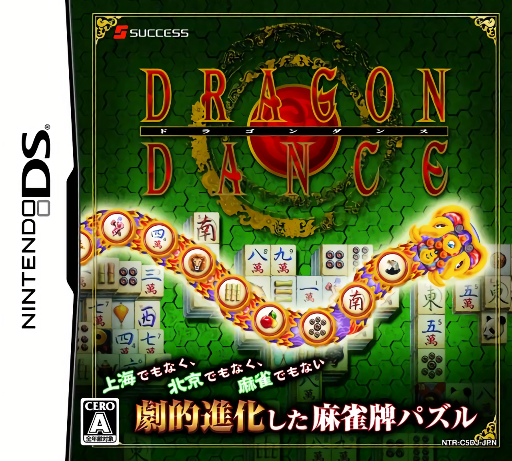
Play Dragon Dance online. Remove matching mahjong tiles before the advancing dragon reaches the gate.
Browser play
Nintendo DS (NDS) — EmulatorJS controls
Default Player 1 keyboard mapping. Change keys in Controller Settings.
| Console button | Keyboard |
|---|---|
| ↑ / ↓ / ← / → | ↑ / ↓ / ← / → |
| A / B / X / Y | Z / X / A / S |
| L / R | Q / E |
| START / SELECT | Enter / V |
| Microphone | Not assigned |
Open Controller Settings to configure your keyboard or gamepad. Touch controls are available on mobile.
How to Play Dragon Dance
Quick start
Choose an introductory stage and compare the dragon's symbols with the available tiles. Remove one valid match, watch how the dragon responds and then plan the next choice. Keep checking the gate distance while learning which tiles the selected mode allows you to take.
Controls
Use the DS stylus to select a tile that matches the symbol shown on the dragon and satisfies the current mode's availability rule. Watch the upper display and lower tile layout together. A tile that looks right may still be unavailable, so check its position before tapping repeatedly.
Dragon Dance — About this game
Dragon Dance is a mahjong-tile puzzle in which symbols on the dragon guide what you remove from the layout. Clear all the tiles while preventing its advance to the gate. The two main modes use different tile-taking rules, so compare availability as well as the picture before selecting a match. Look ahead to the next useful symbol without losing track of the closing distance. Bonus games between stages and harder challenge options give you more to try once the basic pattern recognition becomes familiar. Begin with the opening tutorial and practice the main interaction before pursuing optional rewards. Read the current objective, make one deliberate choice and watch its effect before repeating it. A short first session makes it easier to separate a missed instruction from a difficult challenge. Return to the available menu when you need to check progress or adjust your approach, then continue from the next clear objective.
Dragon Dance Game manuals
Cheats
No cheats have been added for this edition.
Player verification and sources
Browser play was reviewed before this edition was published in the catalogue. The date below is the catalogue publication date, not the game’s original release date.
- Browser test and catalogue publication date
- Browsers and devices
- PC: Chrome, Edge and Firefox. Mobile: Chrome on Android and Safari on iPhone and iPad.
- Player engine and core
- EmulatorJS 4.3.0-pre · nds
- Tested by
- rwEmulator
Sources and editorial basis
rwEmulator reviews edition metadata, release information, game manuals and first-hand browser-play notes. Available manuals are linked below; the editorial policy explains how facts are checked and corrections are handled.