More browsing paths
Play Dragon Tales: Dragon Wings (Europe edition · English) Online
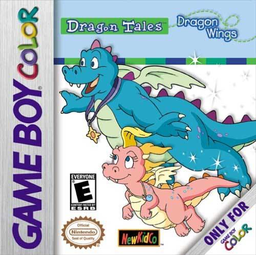
Dragon Tales - Dragon Wings
Play Dragon Tales: Dragon Wings online on GBC. Learn to fly, carry friends and use dragon breath with Ord or Cassie.
Browser play
Game Boy Color (GBC) — EmulatorJS controls
Default Player 1 keyboard mapping. Change keys in Controller Settings.
| Console button | Keyboard |
|---|---|
| ↑ / ↓ / ← / → | ↑ / ↓ / ← / → |
| A / B | Z / X |
| START / SELECT | Enter / V |
Open Controller Settings to configure your keyboard or gamepad. Touch controls are available on mobile.
How to Play Dragon Tales: Dragon Wings
Quick start
Choose Ord or Cassie and Easy for a gentle start. Move over an open classroom door and press A. Use the directional pad to practise flight, then follow the lesson’s task before returning for the next room.
Controls
Directional pad flies left, right, up and down. B uses dragon breath. A chooses options, advances text and enters lesson doors; it is not an ordinary flight action. START pauses.
Dragon Tales: Dragon Wings — About this game
Choose a skill level that suits the player. Easy lets the dragon hover when the pad is released; higher levels add inertia, so stopping needs more planning. Complete open lessons to unlock the next door, learning each new flying task before the story asks you to use it.
Dragon Tales: Dragon Wings Game manuals
Cheats
No cheats have been added for this edition.
Player verification and sources
Browser play was reviewed before this edition was published in the catalogue. The date below is the catalogue publication date, not the game’s original release date.
- Browser test and catalogue publication date
- Browsers and devices
- PC: Chrome, Edge and Firefox. Mobile: Chrome on Android and Safari on iPhone and iPad.
- Player engine and core
- EmulatorJS 4.3.0-pre · gb
- Tested by
- rwEmulator
Sources and editorial basis
rwEmulator reviews edition metadata, release information, game manuals and first-hand browser-play notes. Available manuals are linked below; the editorial policy explains how facts are checked and corrections are handled.