More browsing paths
Play The Dukes of Hazzard: Racing for Home (US edition · English) Online
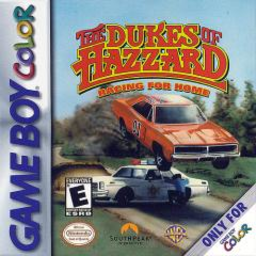
Dukes of Hazzard, The - Racing for Home
Play The Dukes of Hazzard: Racing for Home online on GBC. Drive the General Lee through 27 Hazzard County missions and daring stunts.
Browser play
Game Boy Color (GBC) — EmulatorJS controls
Default Player 1 keyboard mapping. Change keys in Controller Settings.
| Console button | Keyboard |
|---|---|
| ↑ / ↓ / ← / → | ↑ / ↓ / ← / → |
| A / B | Z / X |
| START / SELECT | Enter / V |
Open Controller Settings to configure your keyboard or gamepad. Touch controls are available on mobile.
How to Play The Dukes of Hazzard: Racing for Home
Quick start
Start a mission, read its goal and use A to accelerate. Steer with Left/Right, brake with B and check the mini-map with START when you need to plan the route.
Controls
Left/Right steers, A accelerates and B brakes or reverses. Power-ups activate when collected. START pauses and shows the mini-map; A from there opens the pause menu. Vehicles use automatic transmission.
The Dukes of Hazzard: Racing for Home — About this game
Read the scene objective before accelerating. The 27 missions sometimes call for Daisy’s Jeep or Cooter’s tow truck, and progress is saved as missions are completed. Watch vehicle damage and plan a safe route; a spectacular stunt helps only if you can still reach the required destination.
The Dukes of Hazzard: Racing for Home Game manuals
Cheats
No cheats have been added for this edition.
Player verification and sources
Browser play was reviewed before this edition was published in the catalogue. The date below is the catalogue publication date, not the game’s original release date.
- Browser test and catalogue publication date
- Browsers and devices
- PC: Chrome, Edge and Firefox. Mobile: Chrome on Android and Safari on iPhone and iPad.
- Player engine and core
- EmulatorJS 4.3.0-pre · gb
- Tested by
- rwEmulator
Sources and editorial basis
rwEmulator reviews edition metadata, release information, game manuals and first-hand browser-play notes. Available manuals are linked below; the editorial policy explains how facts are checked and corrections are handled.