More browsing paths
Play F1 World Grand Prix II for Game Boy Color (US edition · English / French / German / Spanish) Online
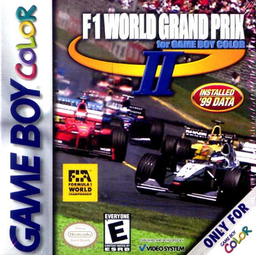
F1 World Grand Prix II for Game Boy Color
Play F1 World Grand Prix II for Game Boy Color online on GBC. Master braking points and racing lines in GBC Formula One competition.
Browser play
Game Boy Color (GBC) — EmulatorJS controls
Default Player 1 keyboard mapping. Change keys in Controller Settings.
| Console button | Keyboard |
|---|---|
| ↑ / ↓ / ← / → | ↑ / ↓ / ← / → |
| A / B | Z / X |
| START / SELECT | Enter / V |
Open Controller Settings to configure your keyboard or gamepad. Touch controls are available on mobile.
How to Play F1 World Grand Prix II for Game Boy Color
Quick start
Choose a race and car, then start with an available circuit. Hold A to accelerate, use B to brake and Left/Right to steer. On the first laps slow down early for bends and return to full speed only after pointing toward the exit.
Controls
Left/Right steers, A accelerates, B brakes and START pauses. Menu choices use the directional pad, A to confirm and B to return.
F1 World Grand Prix II for Game Boy Color — About this game
Each circuit asks you to connect slow corners and faster sections into one continuous line. Braking too late costs more than the speed gained on the approach, especially when traffic blocks the exit. Practise a circuit before entering a longer competition, then judge improvements by clean laps rather than a single risky overtaking move.
Cheats
No cheats have been added for this edition.
Player verification and sources
Browser play was reviewed before this edition was published in the catalogue. The date below is the catalogue publication date, not the game’s original release date.
- Browser test and catalogue publication date
- Browsers and devices
- PC: Chrome, Edge and Firefox. Mobile: Chrome on Android and Safari on iPhone and iPad.
- Player engine and core
- EmulatorJS 4.3.0-pre · gb
- Tested by
- rwEmulator
Sources and editorial basis
rwEmulator reviews edition metadata, release information, game manuals and first-hand browser-play notes. Available manuals are linked below; the editorial policy explains how facts are checked and corrections are handled.