More browsing paths
Play Family BASIC (Japan edition · Japanese) Online
Family BASIC
Before trying Family BASIC in an online environment, check the dedicated 72-key keyboard, BASIC input, RETURN, SAVE/LOAD, and emulator compatibility.
Browser play
Nintendo Entertainment System (NES) / Famicom — EmulatorJS controls
Default Player 1 keyboard mapping. Change keys in Controller Settings.
| Console button | Keyboard |
|---|---|
| ↑ / ↓ / ← / → | ↑ / ↓ / ← / → |
| A / B | Z / X |
| START / SELECT | Enter / V |
Open Controller Settings to configure your keyboard or gamepad. Touch controls are available on mobile.
How to Play Family BASIC
Quick start
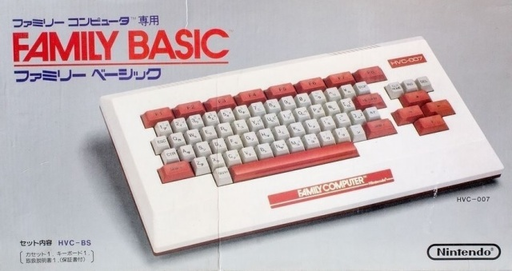
With the power turned off, connect the Family BASIC keyboard to the expansion terminal of the Famicom and start the cartridge. Without a keyboard, the regular version will remain on a black screen and will not proceed. Enter the command on the BASIC screen and execute it with RETURN. If you need to save, connect a compatible cassette recorder to the keyboard's SAVE/LOAD terminal.
Controls
The required input device is a 72-key keyboard exclusively for HVC-007. Enter BASIC using the letter, number, and symbol keys, confirm the line with RETURN, move the editing position with the cursor keys, insert/delete with INS/DEL, and stop execution with STOP. The creation program can read the Famicom's cross key and A/B input using the STICK/STRIG command.
Family BASIC — About this game
``Family Basic'' is a BASIC environment developed by Nintendo, Hudson, and Sharp that allows the Famicom to be used as a home computer. Connect a 72-key dedicated keyboard to the expansion terminal and enter commands to create programs that combine screen display, calculations, music, sprite movement, and controller input. If you connect a cassette-type data recorder, you can save the programs you create to tape and load them later.
Cheats
No cheats have been added for this edition.
Player verification and sources
Browser play was reviewed before this edition was published in the catalogue. The date below is the catalogue publication date, not the game’s original release date.
- Browser test and catalogue publication date
- Browsers and devices
- PC: Chrome, Edge and Firefox. Mobile: Chrome on Android and Safari on iPhone and iPad.
- Player engine and core
- EmulatorJS 4.3.0-pre · nes
- Tested by
- rwEmulator
Sources and editorial basis
rwEmulator reviews edition metadata, release information, game manuals and first-hand browser-play notes. Available manuals are linked below; the editorial policy explains how facts are checked and corrections are handled.