More browsing paths
Play Family BASIC v3.0 (Japan edition · Japanese) Online
Family BASIC V3
Explains special keyboard requirements, BASIC input, sprites, music, and SAVE/LOAD when trying out Family BASIC V3 online.
Browser play
Nintendo Entertainment System (NES) / Famicom — EmulatorJS controls
Default Player 1 keyboard mapping. Change keys in Controller Settings.
| Console button | Keyboard |
|---|---|
| ↑ / ↓ / ← / → | ↑ / ↓ / ← / → |
| A / B | Z / X |
| START / SELECT | Enter / V |
Open Controller Settings to configure your keyboard or gamepad. Touch controls are available on mobile.
How to Play Family BASIC v3.0
Quick start
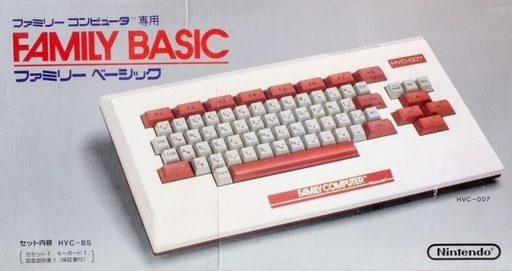
Turn off the Famicom, connect the HVC-007 keyboard to the expansion terminal, and then start V3. If it is not connected, you will not be able to proceed from the screen asking you to connect the keyboard. Enter the command line and execute it with RETURN, then check the short PRINT statement and the included samples first. When using SAVE/LOAD or SAVES/LOADS, please also connect a compatible recorder.
Controls
HVC-007 72-key keyboard is required. Input with alphanumeric, kana, and symbol keys, confirm with RETURN, move with cursor keys, edit with INS/DEL, and interrupt with STOP. The STICK/STRIG command on the BASIC side is used to read the direction and A/B input of the connected Famicom controller from a homemade program.
Family BASIC v3.0 — About this game
"Family BASIC V3" is an expanded version of the BASIC development environment that uses a dedicated Famicom keyboard. You can create your own games by combining not only characters and calculations, but also backgrounds, sprites, music, and controller input, and V3 has added functions such as LOADS and SAVES that handle background data. Although it was released as a single cartridge, the same HVC-007 keyboard as the previous version was required for operation, and a data recorder could be used to save programs and corresponding data to tape.
Cheats
No cheats have been added for this edition.
Player verification and sources
Browser play was reviewed before this edition was published in the catalogue. The date below is the catalogue publication date, not the game’s original release date.
- Browser test and catalogue publication date
- Browsers and devices
- PC: Chrome, Edge and Firefox. Mobile: Chrome on Android and Safari on iPhone and iPad.
- Player engine and core
- EmulatorJS 4.3.0-pre · nes
- Tested by
- rwEmulator
Sources and editorial basis
rwEmulator reviews edition metadata, release information, game manuals and first-hand browser-play notes. Available manuals are linked below; the editorial policy explains how facts are checked and corrections are handled.