More browsing paths
Play Final Fantasy Fables: Chocobo Tales (US edition · English) Online
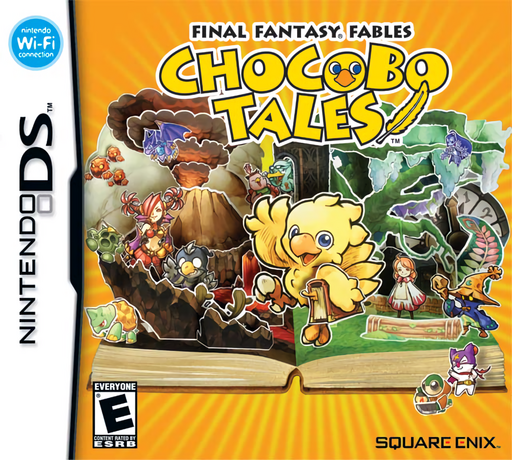
Final Fantasy Fables - Chocobo Tales
Play Final Fantasy Fables: Chocobo Tales online. Explore the island, enter picture-book minigames, slide cards into pop-up duels and learn the DS story-save controls.
Browser play
Nintendo DS (NDS) — EmulatorJS controls
Default Player 1 keyboard mapping. Change keys in Controller Settings.
| Console button | Keyboard |
|---|---|
| ↑ / ↓ / ← / → | ↑ / ↓ / ← / → |
| A / B / X / Y | Z / X / A / S |
| L / R | Q / E |
| START / SELECT | Enter / V |
| Microphone | Not assigned |
Open Controller Settings to configure your keyboard or gamepad. Touch controls are available on mobile.
How to Play Final Fantasy Fables: Chocobo Tales
Quick start
Touch the chocobo on the title screen, choose a file and New Game, enter a name and confirm. Select Story Mode. Move around the island and talk to a character when the pointer appears. Inspect a glowing book, read How to Play and start an available minigame. Before leaving the story, open the menu and choose Save.
Controls
Move with the D-pad or touch screen. A confirms and examines; B cancels. Touch a nearby character or press A at its pointer to talk. X or START opens the story menu; choose Save to record progress. START pauses a minigame. Follow each game’s tapping, sliding or turning instructions. In a pop-up duel, select a card from your hand and slide it upwards.
Final Fantasy Fables: Chocobo Tales — About this game
Final Fantasy Fables: Chocobo Tales begins when Croma opens an evil book and the island’s chocobos are drawn into its pages. As the little feathered hero, explore the island, talk with friends and inspect glowing picture books to enter their games. Each minigame has its own touch rules and goals; progress unlocks games and cards for other modes, including Quick Play. Pop-up duels turn collected cards into battles: choose a card and slide it upwards, with the quicker selection earning the first move that round. Reduce the opponent’s HP to zero to win. Between games, revise decks and save from the story menu, since Story Mode requires a manual save before leaving.
Final Fantasy Fables: Chocobo Tales Game manuals
Cheats
No cheats have been added for this edition.
Player verification and sources
Browser play was reviewed before this edition was published in the catalogue. The date below is the catalogue publication date, not the game’s original release date.
- Browser test and catalogue publication date
- Browsers and devices
- PC: Chrome, Edge and Firefox. Mobile: Chrome on Android and Safari on iPhone and iPad.
- Player engine and core
- EmulatorJS 4.3.0-pre · nds
- Tested by
- rwEmulator
Sources and editorial basis
rwEmulator reviews edition metadata, release information, game manuals and first-hand browser-play notes. Available manuals are linked below; the editorial policy explains how facts are checked and corrections are handled.