More browsing paths
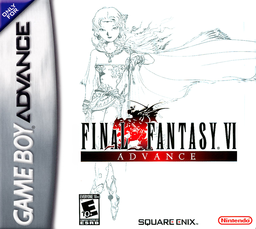
Play Final Fantasy VI Advance (Europe edition) Online
Final Fantasy VI Advance
Play Final Fantasy VI Advance online. Join Terra and a large cast in an Active Time Battle RPG, resist the Gestahlian Empire, and explore the GBA-exclusive dungeon and espers.
Browser play
Game Boy Advance (GBA) — EmulatorJS controls
Default Player 1 keyboard mapping. Change keys in Controller Settings.
| Console button | Keyboard |
|---|---|
| ↑ / ↓ / ← / → | ↑ / ↓ / ← / → |
| A / B | Z / X |
| L / R | Q / E |
| START / SELECT | Enter / V |
Open Controller Settings to configure your keyboard or gamepad. Touch controls are available on mobile.
How to Play Final Fantasy VI Advance
Quick start
Select New Game and advance north through Narshe with Terra and the two imperial soldiers in Magitek armour. Use Magitek Beam on common enemies, search side paths for chests, and continue into the mines toward the frozen esper. After the opening boss, follow the escape route and save from the main menu whenever you are on the field map.
Controls
D-Pad: move the character or cursor. A: talk, interact, confirm, board, or dismount. B: cancel or leave a menu; hold while moving to run. START: open the main menu in the field and pause in battle. SELECT: show or hide the world map and skip a character’s battle turn. L/R change menu pages or toggle single/multiple targets; hold both to flee.
Final Fantasy VI Advance Game manuals
Cheats
No cheats have been added for this edition.
Player verification and sources
Browser play was reviewed before this edition was published in the catalogue. The date below is the catalogue publication date, not the game’s original release date.
- Browser test and catalogue publication date
- Browsers and devices
- PC: Chrome, Edge and Firefox. Mobile: Chrome on Android and Safari on iPhone and iPad.
- Player engine and core
- EmulatorJS 4.3.0-pre · gba
- Tested by
- rwEmulator
Sources and editorial basis
rwEmulator reviews edition metadata, release information, game manuals and first-hand browser-play notes. Available manuals are linked below; the editorial policy explains how facts are checked and corrections are handled.