More browsing paths
Play Fisher-Price: Perfect Fit (US edition · English) Online
Fisher-Price: Perfect Fit
Play Fisher-Price Perfect Fit online and learn its NES controls for moving, flipping and placing shapes, selecting difficulty, pausing, and alternating two-player play.
Browser play
Nintendo Entertainment System (NES) / Famicom — EmulatorJS controls
Default Player 1 keyboard mapping. Change keys in Controller Settings.
| Console button | Keyboard |
|---|---|
| ↑ / ↓ / ← / → | ↑ / ↓ / ← / → |
| A / B | Z / X |
| START / SELECT | Enter / V |
Open Controller Settings to configure your keyboard or gamepad. Touch controls are available on mobile.
How to Play Fisher-Price: Perfect Fit
Quick start
Choose Game Play, one player, and Easy Level 1. Move the falling piece over the silhouette that has the same outline, then press A to lock it in. Later puzzles require the piece to be flipped before it fits, so compare distinctive edges rather than only its general size. Begin without a time limit, then advance when placement feels natural. In two-player play, use B when the game prompts the next turn.
Controls
D-pad moves the menu arrow and drags the selected puzzle piece up, down, left, or right. A confirms selections, locks a piece into its matching silhouette, and advances screens. B handles turn changes in multiplayer and restarts from the pause menu. START pauses. SELECT ends the game or opens the choices for a new game. Two human players use separate controllers when selected.
Fisher-Price: Perfect Fit — About this game
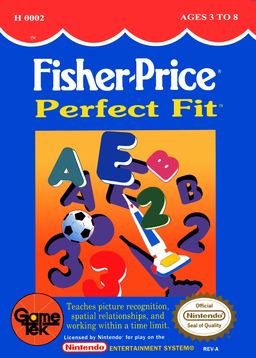
Fisher-Price: Perfect Fit is a shape-recognition activity for the NES. Pictures of letters, numbers, people, everyday objects, and Fisher-Price toys drop onto a board filled with silhouettes; move each piece to the matching outline and, on later levels, flip its orientation before locking it in place. Easy, Normal, and Hard settings add more pieces and progressively shorter time limits. A child can play alone, face the computer character Electro, or alternate with a second player while practising visual matching, spatial relationships, and hand-eye coordination.
Cheats
No cheats have been added for this edition.
Player verification and sources
Browser play was reviewed before this edition was published in the catalogue. The date below is the catalogue publication date, not the game’s original release date.
- Browser test and catalogue publication date
- Browsers and devices
- PC: Chrome, Edge and Firefox. Mobile: Chrome on Android and Safari on iPhone and iPad.
- Player engine and core
- EmulatorJS 4.3.0-pre · nes
- Tested by
- rwEmulator
Sources and editorial basis
rwEmulator reviews edition metadata, release information, game manuals and first-hand browser-play notes. Available manuals are linked below; the editorial policy explains how facts are checked and corrections are handled.