More browsing paths
Play Centipede (Majesco · US edition · English) Online
Centipede
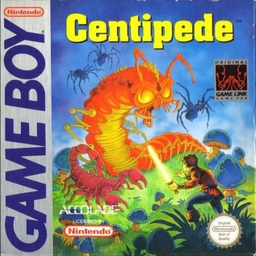
Play Centipede online for Game Boy. Defend the lower part of a mushroom-filled field from an advancing centipede and other insects.
Browser play
Game Boy (GB) — EmulatorJS controls
Default Player 1 keyboard mapping. Change keys in Controller Settings.
| Console button | Keyboard |
|---|---|
| ↑ / ↓ / ← / → | ↑ / ↓ / ← / → |
| A / B | Z / X |
| START / SELECT | Enter / V |
Open Controller Settings to configure your keyboard or gamepad. Touch controls are available on mobile.
How to Play Centipede
Quick start
Start a one-player game and fire with A or B. Clear a narrow shooting lane through the mushrooms, track the lowest centipede section and move away when a spider approaches instead of staying in place.
Controls
D-pad: move within the player area. A or B: fire; hold for repeated shots. START: pause/resume.
Centipede — About this game
Defend the lower part of a mushroom-filled field from an advancing centipede and other insects. Shooting a segment splits the creature into new attacking sections, while mushrooms redirect its descent and can also block your shots. Spiders roam near your movement area, fleas create more mushrooms and scorpions change their danger. Keep firing while leaving enough room to dodge rather than retreating into a crowded corner. Start a one-player game and fire with A or B. Clear a narrow shooting lane through the mushrooms, track the lowest centipede section and move away when a spider approaches instead of staying in place.
Centipede Game manuals
Cheats
No cheats have been added for this edition.
Player verification and sources
Browser play was reviewed before this edition was published in the catalogue. The date below is the catalogue publication date, not the game’s original release date.
- Browser test and catalogue publication date
- Browsers and devices
- PC: Chrome, Edge and Firefox. Mobile: Chrome on Android and Safari on iPhone and iPad.
- Player engine and core
- EmulatorJS 4.3.0-pre · gb
- Tested by
- rwEmulator
Sources and editorial basis
rwEmulator reviews edition metadata, release information, game manuals and first-hand browser-play notes. Available manuals are linked below; the editorial policy explains how facts are checked and corrections are handled.