More browsing paths
Play Crystal Quest (US edition · English) Online
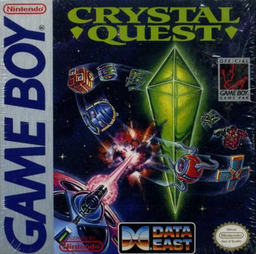
Crystal Quest
Play Crystal Quest online. Pilot a prospecting ship around each screen to collect every crystal and open the gateway to the next wave.
Browser play
Game Boy (GB) — EmulatorJS controls
Default Player 1 keyboard mapping. Change keys in Controller Settings.
| Console button | Keyboard |
|---|---|
| ↑ / ↓ / ← / → | ↑ / ↓ / ← / → |
| A / B | Z / X |
| START / SELECT | Enter / V |
Open Controller Settings to configure your keyboard or gamepad. Touch controls are available on mobile.
How to Play Crystal Quest
Quick start
Press START and move slowly toward the first crystals. Use A against enemies, keep clear of mines and head for the gateway once all crystals are collected.
Controls
Directional pad: move. A: fire the current weapon. B: use a smart bomb; mines remain. START: pause.
Crystal Quest — About this game
Pilot a prospecting ship around each screen to collect every crystal and open the gateway to the next wave. Enemies emerge from side portals, and mines restrict safe routes. Fire lasers or use a limited smart bomb when surrounded, remembering that bombs do not remove mines. Inertia makes sharp turns slide, so begin changing direction before reaching a crowded corner.
Crystal Quest Game manuals
Cheats
No cheats have been added for this edition.
Player verification and sources
Browser play was reviewed before this edition was published in the catalogue. The date below is the catalogue publication date, not the game’s original release date.
- Browser test and catalogue publication date
- Browsers and devices
- PC: Chrome, Edge and Firefox. Mobile: Chrome on Android and Safari on iPhone and iPad.
- Player engine and core
- EmulatorJS 4.3.0-pre · gb
- Tested by
- rwEmulator
Sources and editorial basis
rwEmulator reviews edition metadata, release information, game manuals and first-hand browser-play notes. Available manuals are linked below; the editorial policy explains how facts are checked and corrections are handled.