More browsing paths
Play Darkman (US_EU edition · English) Online
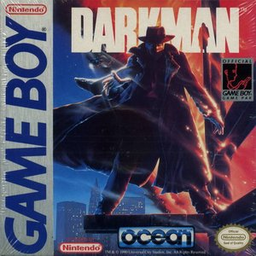
Darkman
Play Darkman online. Darkman fights through timed city stages against the criminals who destroyed his former life. Directional attacks let him strike right or left regardless of where he is moving, and combining both buttons produces a jump.
Browser play
Game Boy (GB) — EmulatorJS controls
Default Player 1 keyboard mapping. Change keys in Controller Settings.
| Console button | Keyboard |
|---|---|
| ↑ / ↓ / ← / → | ↑ / ↓ / ← / → |
| A / B | Z / X |
| START / SELECT | Enter / V |
Open Controller Settings to configure your keyboard or gamepad. Touch controls are available on mobile.
How to Play Darkman
Quick start
Press START and learn A/right and B/left attacks. Press A+B together to jump; keep enemies on one side before trying to grab a stunned opponent.
Controls
Directional pad: move. A: attack to the right. B: attack to the left. A+B: jump. Up + A+B: jump onto a raised platform behind Darkman. START: pause.
Darkman — About this game
Darkman fights through timed city stages against the criminals who destroyed his former life. Directional attacks let him strike right or left regardless of where he is moving, and combining both buttons produces a jump. Stun opponents to grab, headbutt or throw them, and collect dropped weapons when a fight becomes crowded. Watch power and the timer while choosing when to advance or defend.
Darkman Game manuals
Cheats
No cheats have been added for this edition.
Player verification and sources
Browser play was reviewed before this edition was published in the catalogue. The date below is the catalogue publication date, not the game’s original release date.
- Browser test and catalogue publication date
- Browsers and devices
- PC: Chrome, Edge and Firefox. Mobile: Chrome on Android and Safari on iPhone and iPad.
- Player engine and core
- EmulatorJS 4.3.0-pre · gb
- Tested by
- rwEmulator
Sources and editorial basis
rwEmulator reviews edition metadata, release information, game manuals and first-hand browser-play notes. Available manuals are linked below; the editorial policy explains how facts are checked and corrections are handled.