More browsing paths
Play Maru's Mission (US edition · English) Online
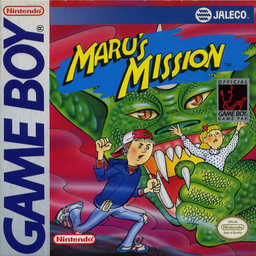
Maru's Mission
Play Maru's Mission online. Travel with Maru to rescue Cori, crossing land and underwater sections with a growing set of weapons.
Browser play
Game Boy (GB) — EmulatorJS controls
Default Player 1 keyboard mapping. Change keys in Controller Settings.
| Console button | Keyboard |
|---|---|
| ↑ / ↓ / ← / → | ↑ / ↓ / ← / → |
| A / B | Z / X |
| START / SELECT | Enter / V |
Open Controller Settings to configure your keyboard or gamepad. Touch controls are available on mobile.
How to Play Maru's Mission
Quick start
Start the mission, compare short and held A jumps and use B from a safe distance. Check the special weapon before pressing SELECT.
Controls
Directional pad: move. A: jump; hold longer for more height. B: use current weapon. SELECT: activate special weapon. START: pause.
Maru's Mission — About this game
Travel with Maru to rescue Cori, crossing land and underwater sections with a growing set of weapons. Holding jump longer changes the height, helping reach platforms while avoiding enemies. Use ordinary attacks at range and activate special equipment when the situation calls for it. The life meter demands steady progress, and defenders at the ends of rounds test whether you have learned each weapon's reach.
Maru's Mission Game manuals
Cheats
No cheats have been added for this edition.
Player verification and sources
Browser play was reviewed before this edition was published in the catalogue. The date below is the catalogue publication date, not the game’s original release date.
- Browser test and catalogue publication date
- Browsers and devices
- PC: Chrome, Edge and Firefox. Mobile: Chrome on Android and Safari on iPhone and iPad.
- Player engine and core
- EmulatorJS 4.3.0-pre · gb
- Tested by
- rwEmulator
Sources and editorial basis
rwEmulator reviews edition metadata, release information, game manuals and first-hand browser-play notes. Available manuals are linked below; the editorial policy explains how facts are checked and corrections are handled.