More browsing paths
Play Ms. Pac-Man (Europe edition · English) Online
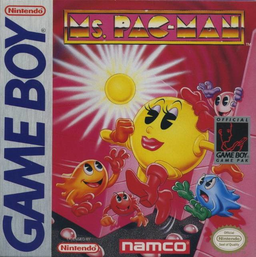
Ms. Pac-Man
Play Ms. Pac-Man online on Game Boy. Ms.
Browser play
Game Boy (GB) — EmulatorJS controls
Default Player 1 keyboard mapping. Change keys in Controller Settings.
| Console button | Keyboard |
|---|---|
| ↑ / ↓ / ← / → | ↑ / ↓ / ← / → |
| A / B | Z / X |
| START / SELECT | Enter / V |
Open Controller Settings to configure your keyboard or gamepad. Touch controls are available on mobile.
How to Play Ms. Pac-Man
Quick start
Select 1 Player and press START. Try the default zoom view, then compare the whole-maze option at the title screen; save one large pellet near an uncleared route instead of taking every one immediately.
Controls
D-pad: move; START: pause.
Ms. Pac-Man — About this game
Ms. Pac-Man sends you through four mazes of pellets, fruit and pursuing ghosts. Save the large pellets for a useful reversal, then decide whether to chase edible ghosts or clear a dangerous corner. A close-up view makes nearby movement easy to see, while the small whole-maze view helps plan escape routes; two players can also take turns competing for the better score.
Select 1 Player and press START. Try the default zoom view, then compare the whole-maze option at the title screen; save one large pellet near an uncleared route instead of taking every one immediately.
Ms. Pac-Man Game manuals
Cheats
No cheats have been added for this edition.
Player verification and sources
Browser play was reviewed before this edition was published in the catalogue. The date below is the catalogue publication date, not the game’s original release date.
- Browser test and catalogue publication date
- Browsers and devices
- PC: Chrome, Edge and Firefox. Mobile: Chrome on Android and Safari on iPhone and iPad.
- Player engine and core
- EmulatorJS 4.3.0-pre · gb
- Tested by
- rwEmulator
Sources and editorial basis
rwEmulator reviews edition metadata, release information, game manuals and first-hand browser-play notes. Available manuals are linked below; the editorial policy explains how facts are checked and corrections are handled.