More browsing paths
Play Oddworld Adventures (US_EU edition · English) Online
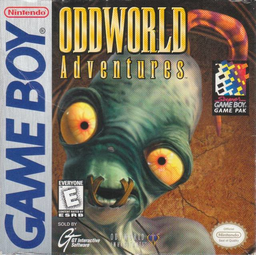
Oddworld Adventures
Play Oddworld Adventures online. Guide Abe through the Paramonian Temple to reach the levers that light its sacred fires. He has no ordinary weapon, so use stealth, thrown rocks and meat to deal with hazards or distract creatures.
Browser play
Game Boy (GB) — EmulatorJS controls
Default Player 1 keyboard mapping. Change keys in Controller Settings.
| Console button | Keyboard |
|---|---|
| ↑ / ↓ / ← / → | ↑ / ↓ / ← / → |
| A / B | Z / X |
| START / SELECT | Enter / V |
Open Controller Settings to configure your keyboard or gamepad. Touch controls are available on mobile.
How to Play Oddworld Adventures
Quick start
Start the temple journey and practise B jumps. Use Down over a rock to pick it up, A to throw it and Up with a direction to sneak past danger.
Controls
Directional pad: move; Down crouch/pick up; Down+Left/Right roll; Up+Left/Right sneak. A: use or throw held item; possessed Slig fires. B: jump. SELECT: hold to chant/possess; access password/GameSpeak commands.
Oddworld Adventures — About this game
Guide Abe through the Paramonian Temple to reach the levers that light its sacred fires. He has no ordinary weapon, so use stealth, thrown rocks and meat to deal with hazards or distract creatures. Chanting can possess a visible Slig from a safe position, turning an enemy's gun into a temporary tool. Learn the route and the required songs rather than rushing into every room, and use clues to solve the temple's obstacles.
Oddworld Adventures Game manuals
Cheats
No cheats have been added for this edition.
Player verification and sources
Browser play was reviewed before this edition was published in the catalogue. The date below is the catalogue publication date, not the game’s original release date.
- Browser test and catalogue publication date
- Browsers and devices
- PC: Chrome, Edge and Firefox. Mobile: Chrome on Android and Safari on iPhone and iPad.
- Player engine and core
- EmulatorJS 4.3.0-pre · gb
- Tested by
- rwEmulator
Sources and editorial basis
rwEmulator reviews edition metadata, release information, game manuals and first-hand browser-play notes. Available manuals are linked below; the editorial policy explains how facts are checked and corrections are handled.