More browsing paths
Play Super 69 in 1 (Unl · World edition · English) Online
Super 69 in 1
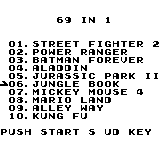
Play Super 69 in 1 online for Game Boy. Browse its numbered cartridge menu, choose an entry with Up and Down, and press START to begin.
Browser play
Game Boy (GB) — EmulatorJS controls
Default Player 1 keyboard mapping. Change keys in Controller Settings.
| Console button | Keyboard |
|---|---|
| ↑ / ↓ / ← / → | ↑ / ↓ / ← / → |
| A / B | Z / X |
| START / SELECT | Enter / V |
Open Controller Settings to configure your keyboard or gamepad. Touch controls are available on mobile.
How to Play Super 69 in 1
Quick start
At the numbered menu, use Up or Down to move the arrow. Choose a displayed entry, such as Mario Land or Alleyway, and press START. Read the opening screen of the loaded selection before beginning play.
Controls
Menu: D-pad Up/Down moves the pointer; START launches the highlighted entry. After loading, follow the selected game’s own button and menu prompts.
Super 69 in 1 — About this game
The collection places its selection screen at the centre of the experience. A small arrow marks the current item, while the numbered list lets you compare the entries before launching one. The visible names come from several familiar series, so take a moment to read the list before choosing an entry. Begin with a name you recognise, check the title shown after loading and follow that game’s opening instructions. The menu label is a useful guide to navigation; the selected game supplies the rules for what comes next.
Super 69 in 1 Game manuals
Cheats
No cheats have been added for this edition.
Player verification and sources
Browser play was reviewed before this edition was published in the catalogue. The date below is the catalogue publication date, not the game’s original release date.
- Browser test and catalogue publication date
- Browsers and devices
- PC: Chrome, Edge and Firefox. Mobile: Chrome on Android and Safari on iPhone and iPad.
- Player engine and core
- EmulatorJS 4.3.0-pre · gb
- Tested by
- rwEmulator
Sources and editorial basis
rwEmulator reviews edition metadata, release information, game manuals and first-hand browser-play notes. Available manuals are linked below; the editorial policy explains how facts are checked and corrections are handled.