More browsing paths
Play TripleA (Proto · US edition · English) Online
TripleA
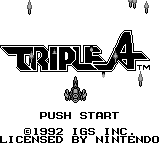
Play TripleA for Game Boy online. This USA prototype opens with the TRIPLE A logo against a star field, framed by small spacecraft imagery
Browser play
Game Boy (GB) — EmulatorJS controls
Default Player 1 keyboard mapping. Change keys in Controller Settings.
| Console button | Keyboard |
|---|---|
| ↑ / ↓ / ← / → | ↑ / ↓ / ← / → |
| A / B | Z / X |
| START / SELECT | Enter / V |
Open Controller Settings to configure your keyboard or gamepad. Touch controls are available on mobile.
How to Play TripleA
Quick start
Press START at the title’s PUSH START prompt. Read the screen that follows, then use the displayed choices and basic directional controls to continue.
Controls
START: enter from the title. D-pad: directional movement or menu selection. A: confirm an offered action. B: cancel/back where the current screen allows it. Use the prototype’s current prompts to guide further actions.
TripleA — About this game
This USA prototype opens with the TRIPLE A logo against a star field, framed by small spacecraft imagery. The title’s PUSH START prompt is the entry point to a short look at this early Game Boy software. Begin there, read the next screen’s directions and take a moment to learn the available movement and confirmation controls. The space-themed presentation gives the prototype its immediate visual identity. Press START at the title’s PUSH START prompt. Read the screen that follows, then use the displayed choices and basic directional controls to continue.
Cheats
No cheats have been added for this edition.
Player verification and sources
Browser play was reviewed before this edition was published in the catalogue. The date below is the catalogue publication date, not the game’s original release date.
- Browser test and catalogue publication date
- Browsers and devices
- PC: Chrome, Edge and Firefox. Mobile: Chrome on Android and Safari on iPhone and iPad.
- Player engine and core
- EmulatorJS 4.3.0-pre · gb
- Tested by
- rwEmulator
Sources and editorial basis
rwEmulator reviews edition metadata, release information, game manuals and first-hand browser-play notes. Available manuals are linked below; the editorial policy explains how facts are checked and corrections are handled.