More browsing paths
Play Medal City (Sega Game Toshokan · Japan edition · Japanese) Online
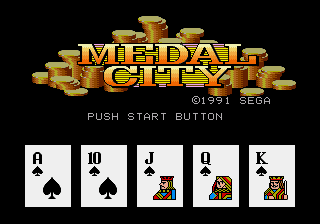
Medal City
Play Medal City online. Choose from three types ofメダル, blackjack and slots, and manage your own medals and play at the Sega Game Library.
Browser play
Sega Genesis / Mega Drive — EmulatorJS controls
Default Player 1 keyboard mapping. Change keys in Controller Settings.
| Console button | Keyboard |
|---|---|
| ↑ / ↓ / ← / → | ↑ / ↓ / ← / → |
| A / B / C | S / X / Z |
| X / Y / Z | Q / A / E |
| START / MODE | Enter / V |
Open Controller Settings to configure your keyboard or gamepad. Touch controls are available on mobile.
How to Play Medal City
Quick start
First, choose either Poker, Blackjack or Slots and bet within the range of your own medals. Choose the札 to exchange, determine the additional cards to the extent that you don’t exceed 21, and then set the number of bets on the slot to turn the reels. Lower the bet when you lose.
Controls
Directional Key: Move game selection/bet, card, menu item. A: Decision, card selection, slot operation. B: Cancel/Back. C: Determination or auxiliary operation according to the scene. START: Start. In each game, follow the cursor and display of the screen, confirm the bet, then proceed the bill or reel.
Medal City Game manuals
Cheats
No cheats have been added for this edition.
Player verification and sources
Browser play was reviewed before this edition was published in the catalogue. The date below is the catalogue publication date, not the game’s original release date.
- Browser test and catalogue publication date
- Browsers and devices
- PC: Chrome, Edge and Firefox. Mobile: Chrome on Android and Safari on iPhone and iPad.
- Player engine and core
- EmulatorJS 4.3.0-pre · segaMD
- Tested by
- rwEmulator
Sources and editorial basis
rwEmulator reviews edition metadata, release information, game manuals and first-hand browser-play notes. Available manuals are linked below; the editorial policy explains how facts are checked and corrections are handled.