More browsing paths
Play Planet Message Quiz (Sega Channel · Japan edition · Japanese) Online
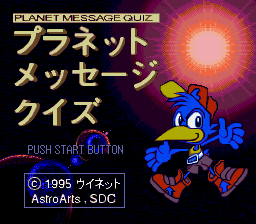
Planet Message Quiz
Planet Message Quiz is a software for Japanese Sega Channels, which includes a文nomical quiz, planets and cons ations, starry sky simulation, and horoscope.
Browser play
Sega Genesis / Mega Drive — EmulatorJS controls
Default Player 1 keyboard mapping. Change keys in Controller Settings.
| Console button | Keyboard |
|---|---|
| ↑ / ↓ / ← / → | ↑ / ↓ / ← / → |
| A / B / C | S / X / Z |
| X / Y / Z | Q / A / E |
| START / MODE | Enter / V |
Open Controller Settings to configure your keyboard or gamepad. Touch controls are available on mobile.
How to Play Planet Message Quiz
Quick start
From the title screen, select the desired corners such as a文nomical quiz, star commentary, starry simulation, and horoscope. In the quiz, read the problem and options carefully and answer individually if there is a time limit. After checking the information of the planet and zodiac sign in the commentary corner, return to the quiz will be easier to answer.
Controls
Directional button: Move menu items and answer candidates. A: Select/deter . B: Turn off/return the screen. C: Estimated when used for displaying auxiliary functions and information displayed on the screen. START: Start/deter。 from the title. Prioritize screen display because there is no complete button table.
Planet Message Quiz Game manuals
Cheats
No cheats have been added for this edition.
Player verification and sources
Browser play was reviewed before this edition was published in the catalogue. The date below is the catalogue publication date, not the game’s original release date.
- Browser test and catalogue publication date
- Browsers and devices
- PC: Chrome, Edge and Firefox. Mobile: Chrome on Android and Safari on iPhone and iPad.
- Player engine and core
- EmulatorJS 4.3.0-pre · segaMD
- Tested by
- rwEmulator
Sources and editorial basis
rwEmulator reviews edition metadata, release information, game manuals and first-hand browser-play notes. Available manuals are linked below; the editorial policy explains how facts are checked and corrections are handled.