More browsing paths
Play Kinetic Connection (Japan edition · English) Online
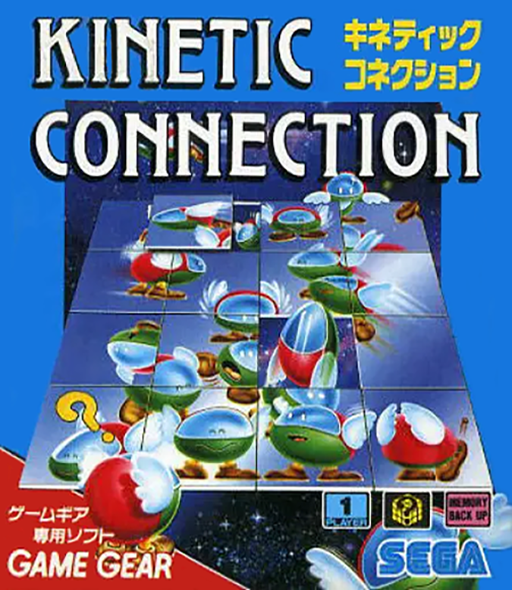
Kinetic Connection
Play Kinetic Connection for Game Gear online. Reassemble animated pictures, move tiles and learn how the onscreen turning tool works.
Browser play
Sega Game Gear — EmulatorJS controls
Default Player 1 keyboard mapping. Change keys in Controller Settings.
| Console button | Keyboard |
|---|---|
| ↑ / ↓ / ← / → | ↑ / ↓ / ← / → |
| 1 / 2 | X / Z |
| START | Enter |
Open Controller Settings to configure your keyboard or gamepad. Touch controls are available on mobile.
How to Play Kinetic Connection
Quick start
Press START, choose a picture and challenge, then study its animation. Move the cursor with the pad and use 1 to select tools or pieces. To turn a tile, select the onscreen rotation tool first, apply it, then deselect the tool.
Controls
Pad: move cursor. 1: select or apply a tool and handle a piece. 2: cancel/release selection. Rotation is selected through the onscreen tool before choosing the tile. START: begin.
Kinetic Connection — About this game
Kinetic Connection for Game Gear turns a picture puzzle into a test of movement as well as shape. The tiles keep animating while you rearrange them, so a familiar object is only one clue: its timing and direction also help reveal where it belongs. Study the complete picture before tackling the scramble. Start with distinctive borders or movement paths, then compare neighboring tiles across a few animation frames. Rotation uses an onscreen tool: choose the turning direction, apply it to a tile and switch the tool off before working on something else. Seven pictures each offer three challenges. Work in small connected groups instead of repeatedly disturbing the whole board, especially when similar objects fill much of the image.
Kinetic Connection Game manuals
Cheats
No cheats have been added for this edition.
Player verification and sources
Browser play was reviewed before this edition was published in the catalogue. The date below is the catalogue publication date, not the game’s original release date.
- Browser test and catalogue publication date
- Browsers and devices
- PC: Chrome, Edge and Firefox. Mobile: Chrome on Android and Safari on iPhone and iPad.
- Player engine and core
- EmulatorJS 4.3.0-pre · segaGG
- Tested by
- rwEmulator
Sources and editorial basis
rwEmulator reviews edition metadata, release information, game manuals and first-hand browser-play notes. Available manuals are linked below; the editorial policy explains how facts are checked and corrections are handled.