More browsing paths
Play Gokuraku Yuugi: Game Tengoku (Japan edition · Japanese) Online
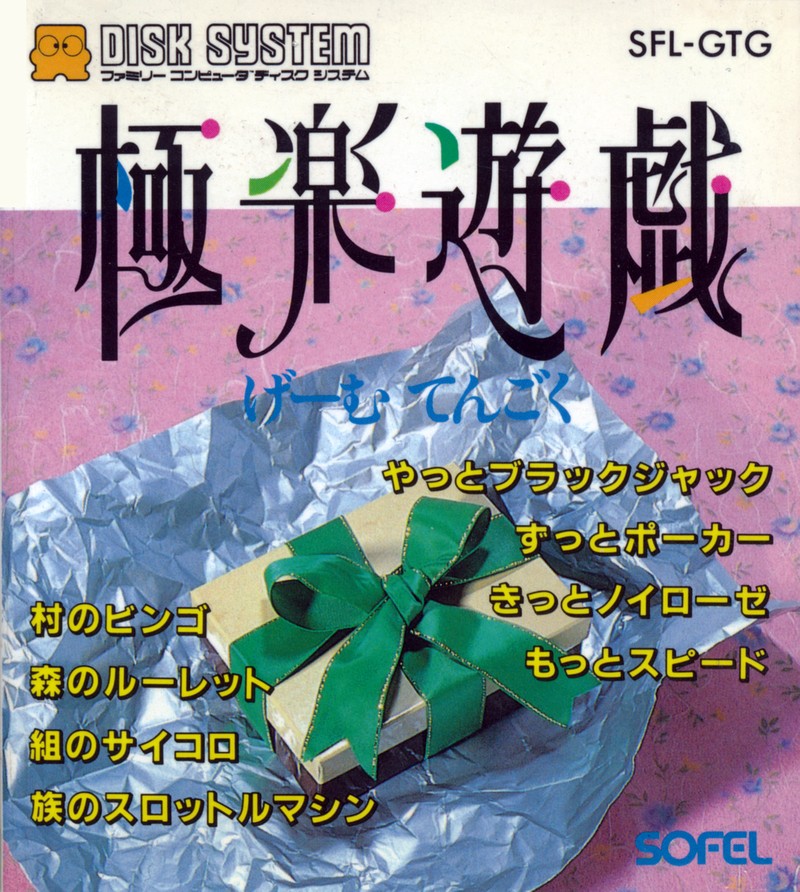
Gokuraku Yuugi: Game Tengoku
Play "Gametengoku" online. Includes bingo, dice, roulette and four card games. Introducing the differences between single-person and interpersonal use, and the basic operations and how to get started with the eight events.
Browser play
Nintendo Entertainment System (NES) / Famicom — EmulatorJS controls
Default Player 1 keyboard mapping. Change keys in Controller Settings.
| Console button | Keyboard |
|---|---|
| ↑ / ↓ / ← / → | ↑ / ↓ / ← / → |
| A / B | Z / X |
| START / SELECT | Enter / V |
Open Controller Settings to configure your keyboard or gamepad. Touch controls are available on mobile.
How to Play Gokuraku Yuugi: Game Tengoku
Quick start
Open the channel you want to play from the menu. If you want to try out the operation first, select "Group Dice", roll the dice with A, stop with B, and see how it rolls. In "Village Bingo", if you hit the running chicken with A, a numbered egg will appear, so check the same number on a paper bingo card. If you want to play alone, choose Nervous Breakdown, and if you want to play with friends, choose Card Games. Start with a small number of betting points for events that use betting points, and keep in mind the maximum of 30 points for roulette and slots.
Controls
"Group Dice": Roll with A, stop with B. "Village Bingo": Hit the chicken with A. "Forest Roulette": Select a player with the up and down arrow keys, confirm with the right, and cancel with the left. Adjust your bets and points with A/B. "Tribe Throttle Machine": Select the player and betting line with up and down, decide the score with A/B, and start after everyone has set. Turn left and right to GO/STOP, and press A to start/stop rotation. "Finally Black Jack": Select a parent from above and below to start. After deciding on your bet and pressing START, draw a card with A and stop with B. "Poker all the time": Player selects cards with up and down, selects cards with left and right, and exchanges with A. After exchanging, move to "Yaku" and press A. "I'm sure it's a neurosis": Use the cross keys to select a card, press A to turn it over, and if it doesn't match, press B to turn it over. "More speed": Select a card with left and right and put it out with A. If you can no longer play all the cards, press START to update the tableau piles.
Gokuraku Yuugi: Game Tengoku — About this game
It is written as ``Gokuraku Yugi'' and is pronounced as ``Game Tengoku'', and is software for Sophel's disk system. Choose from eight channels to play: bingo, roulette, dice, slots, blackjack, poker, nervous breakdown, and speed. It's not all a game against the computer; ``Village Bingo'' is a lottery machine that is used in combination with the cards in hand, and ``Piece Dice'' is a tool to create results that can be used for other games. In roulette and slot games, players aim to win by allocating their points, while in nerf games, they memorize the positions of the cards they have seen once and line up their pairs. In addition to games that can be tried alone, it also includes events that can be enjoyed with other people, such as blackjack, poker, and speed. Rather than being a game that progresses through a long story, the game is characterized by a structure where you can choose short games depending on the number of people present and your mood.
Cheats
No cheats have been added for this edition.
Player verification and sources
Browser play was reviewed before this edition was published in the catalogue. The date below is the catalogue publication date, not the game’s original release date.
- Browser test and catalogue publication date
- Browsers and devices
- PC: Chrome, Edge and Firefox. Mobile: Chrome on Android and Safari on iPhone and iPad.
- Player engine and core
- EmulatorJS 4.3.0-pre · nes
- Tested by
- rwEmulator
Sources and editorial basis
rwEmulator reviews edition metadata, release information, game manuals and first-hand browser-play notes. Available manuals are linked below; the editorial policy explains how facts are checked and corrections are handled.