More browsing paths
Play Ide Yousuke Meijin no Jissen Mahjong II (Japan edition · Japanese) Online
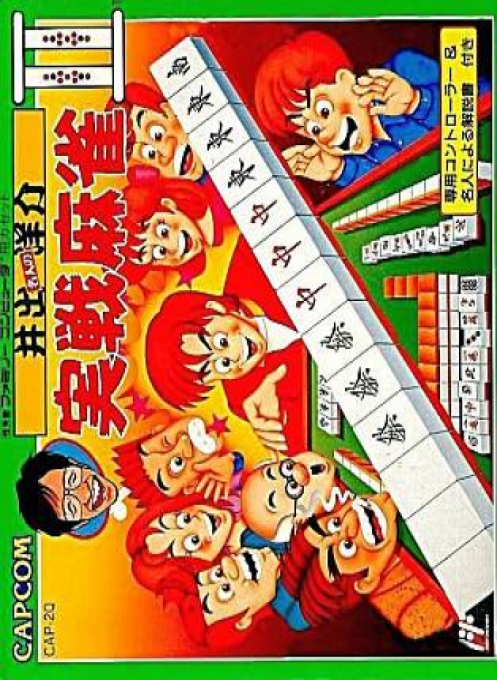
Ide Yōsuke Meijin no Jissen Mahjong II
Yosuke Ide's Master's Practical Mahjong II online. Guide to league promotion, 50-question mahjong learning, and the adventures of a greengrocer's mahjong player. You can also check how to use the dedicated controller and the regular I-pad.
Browser play
Nintendo Entertainment System (NES) / Famicom — EmulatorJS controls
Default Player 1 keyboard mapping. Change keys in Controller Settings.
| Console button | Keyboard |
|---|---|
| ↑ / ↓ / ← / → | ↑ / ↓ / ← / → |
| A / B | Z / X |
| START / SELECT | Enter / V |
Open Controller Settings to configure your keyboard or gamepad. Touch controls are available on mobile.
How to Play Ide Yousuke Meijin no Jissen Mahjong II
Quick start
Prepare an input equivalent to a dedicated mahjong controller, move the cursor to SEL play mode and press ST. First of all, if you want to "Learn Mahjong!", select either "Discard tiles automatic" where you select the important parts of the discard tiles yourself, or "Discard tiles manual" where you play all the tiles yourself, select with SEL and decide with ST, select the rank of A ~ E in the same way and start. When the situation is pointed out, answer the discarded tile using the letter key on the tile and continue learning until you can win. The league match begins with the local selection, so remember the tile positions in preparation for the time limit for the top players. ``Greengrocer's Mahjong Player'' chooses ``From the beginning'' or ``Password'' and advances through the game while exploring the town.
Controls
The game uses a dedicated mahjong controller. A~N corresponds to the letter position of the tile, N is for picking, and the letter key for unnecessary tiles is for discarding tiles. After pressing the reach key and cutting the tiles, Ron and Tsumo Waryo are both dedicated Ron keys. For Kang/Pon/Chi, press each dedicated key, and if there are multiple candidates, select them using the letter key of the tile you are using. SEL selects an item, and holding it down lowers the game screen to make it easier to see your opponent's tiles. ST begins, and continues with points exchange after the end of the game. M is also used for canceling. When moving in ``Greengrocer's Mahjong Player'', use the cross on the I-pad to move and select, press A to display commands, confirm, and send text, press B to cancel, and press SELECT to explain pre-match tsumikomi techniques. A normal pad cannot be used as a substitute for games or mini-games. Online-specific key assignments have not been confirmed.
Ide Yousuke Meijin no Jissen Mahjong II — About this game
The sequel, ``Yosuke Ide Master's Practical Mahjong II,'' features three games: ``Fight! League Battle,'' ``Learn Mahjong!'' and ``Omake (Greengrocer's Mahjong Player).'' The league matches will begin with local selection, and will go through the C, B, A League, Meijin Match, and the Strongest Rank Match, with the aim of competing against Ide Pro. In the higher ranks, there is a time limit for discarding tiles, and if you think about it too long, the tile in the N position will be automatically discarded, so your handwork and quick judgment will be tested. The learning mode consists of 50 questions based on key points from actual battles, divided into five stages, and if you answer all questions correctly, a game will open where you can play freely. "Greengrocer's Mahjong Player" is an RPG in which the main character travels around town in pursuit of his father's disappearance, acquiring skills and tools while playing mahjong games. Games are played using a dedicated controller, but you can also use the regular I-controller when moving around in this adventure. The content and the way you use the controls are different from the original free game mode.
Cheats
No cheats have been added for this edition.
Player verification and sources
Browser play was reviewed before this edition was published in the catalogue. The date below is the catalogue publication date, not the game’s original release date.
- Browser test and catalogue publication date
- Browsers and devices
- PC: Chrome, Edge and Firefox. Mobile: Chrome on Android and Safari on iPhone and iPad.
- Player engine and core
- EmulatorJS 4.3.0-pre · nes
- Tested by
- rwEmulator
Sources and editorial basis
rwEmulator reviews edition metadata, release information, game manuals and first-hand browser-play notes. Available manuals are linked below; the editorial policy explains how facts are checked and corrections are handled.