More browsing paths
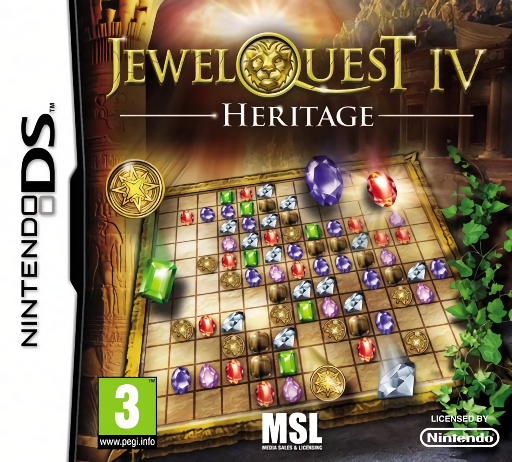
Play Jewel Quest IV - Heritage (Europe edition · English / French / German / Dutch) Online
Jewel Quest IV - Heritage
Play Jewel Quest IV - Heritage online. Rebuild a family tree while turning boards gold under limited-jewel and limited-swap rules.
Browser play
Nintendo DS (NDS) — EmulatorJS controls
Default Player 1 keyboard mapping. Change keys in Controller Settings.
| Console button | Keyboard |
|---|---|
| ↑ / ↓ / ← / → | ↑ / ↓ / ← / → |
| A / B / X / Y | Z / X / A / S |
| L / R | Q / E |
| START / SELECT | Enter / V |
| Microphone | Not assigned |
Open Controller Settings to configure your keyboard or gamepad. Touch controls are available on mobile.
How to Play Jewel Quest IV - Heritage
Quick start
Start the first story board and locate its unfinished squares. Make a simple three-symbol match, watch the replacement symbols and work toward a corner before it becomes hard to reach. Read a new board's special requirement before spending a collected clearing power.
Controls
Use the DS stylus to swap two neighboring symbols up, down, left or right into a row or column of at least three. Watch which underlying squares turn gold, then aim the next move at an unfinished area. When a collected special clear is available, select it through the displayed control and touch the intended square.
Jewel Quest IV - Heritage — About this game
Heritage sends Rupert Pack after the Golden Jewel Board and the family claims surrounding it. A family tree becomes the route through the puzzle collection: recover portrait pieces, place them with the corresponding ancestor and open associated challenges. Each board still asks for gold coverage, but limited-jewel and limited-swap variants change what you can afford to do. Begin at the first available portrait, read which resource is restricted and plan a match that reaches an uncolored square. Save a special square-changing piece for an awkward remainder rather than spending it on a place a normal match can easily cover. Begin with the opening instructions and practice the main interaction before pursuing optional rewards. Read the current objective, make one deliberate choice and watch its effect before repeating it. A short first session makes it easier to separate a missed instruction from a difficult challenge. Return to the available menu when you need to check progress or adjust your approach, then continue from the next clear objective.
Jewel Quest IV - Heritage Game manuals
Cheats
No cheats have been added for this edition.
Player verification and sources
Browser play was reviewed before this edition was published in the catalogue. The date below is the catalogue publication date, not the game’s original release date.
- Browser test and catalogue publication date
- Browsers and devices
- PC: Chrome, Edge and Firefox. Mobile: Chrome on Android and Safari on iPhone and iPad.
- Player engine and core
- EmulatorJS 4.3.0-pre · nds
- Tested by
- rwEmulator
Sources and editorial basis
rwEmulator reviews edition metadata, release information, game manuals and first-hand browser-play notes. Available manuals are linked below; the editorial policy explains how facts are checked and corrections are handled.