More browsing paths
Play Jongbou (Japan edition · Japanese) Online
Jongbou
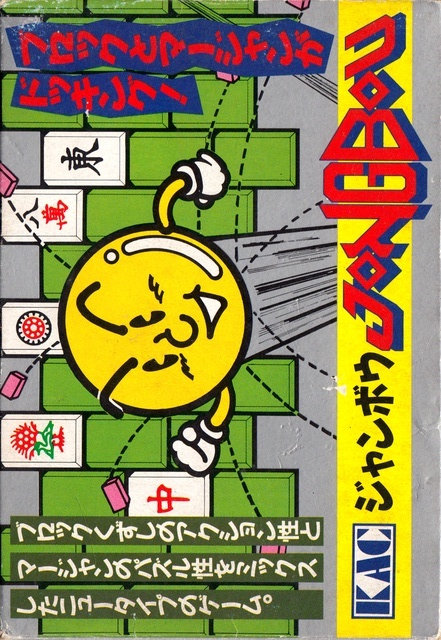
Jambo online. A FC game where you collect tiles while returning the ball, and aim to win by choosing the discarded tiles. Introducing B's high-speed movement, opening stations, and normal controller operations.
Browser play
Nintendo Entertainment System (NES) / Famicom — EmulatorJS controls
Default Player 1 keyboard mapping. Change keys in Controller Settings.
| Console button | Keyboard |
|---|---|
| ↑ / ↓ / ← / → | ↑ / ↓ / ← / → |
| A / B | Z / X |
| START / SELECT | Enter / V |
Open Controller Settings to configure your keyboard or gamepad. Touch controls are available on mobile.
How to Play Jongbou
Quick start
Press SELECT on the title, select 1P, and start with START. Please wait as the black screen may continue for a long time until it starts. Once the dora and tiles have been displayed, the ball begins to move. Align the paddles on the left and right sides, and prioritize returning the falling ball at first. After picking up a tile, while the ball is at rest, select a discard tile with the left and right buttons and confirm with A. Hold B while moving only when you want to catch up with a far ball, so you don't accelerate too much and pass it.
Controls
D-pad left and right: Move the paddle, select the discarded tile after picking. A: Deciding which tiles to discard. Left/right while holding B: Move the paddle at high speed. START: Starts the game with the title and pauses during play. SELECT: Select 1P/2P by title. After the tiles are dealt, the balls start moving automatically. When you pick up a tile, you will be asked to choose a discarded tile, and the ball will stop during that time, so you can make a decision calmly.
Jongbou — About this game
A combination of block breaking and mahjong, where you hit the mahjong tiles lined up above with a ball and catch the falling tiles with a paddle to create a hand. If you hit a back tile once, it will turn heads, and if you hit it again, it will fall. Rather than adding to the number of tiles taken, players choose a tile to discard from their hand, which alternates between chasing the ball and making hand-made decisions. Once the hand is completed, you can exit the stage before destroying all the remaining blocks, and on the normal stage, you can advance even in a situation where all the blocks are erased. There are also differences in the number of times you hit the dot stick, and how you break up the board is important. Special tiles and dice have effects that help the ball and paddle, and you can't miss them as you progress through all 36 screens. First of all, prioritize returning the ball safely over the tiles you want.
Cheats
No cheats have been added for this edition.
Player verification and sources
Browser play was reviewed before this edition was published in the catalogue. The date below is the catalogue publication date, not the game’s original release date.
- Browser test and catalogue publication date
- Browsers and devices
- PC: Chrome, Edge and Firefox. Mobile: Chrome on Android and Safari on iPhone and iPad.
- Player engine and core
- EmulatorJS 4.3.0-pre · nes
- Tested by
- rwEmulator
Sources and editorial basis
rwEmulator reviews edition metadata, release information, game manuals and first-hand browser-play notes. Available manuals are linked below; the editorial policy explains how facts are checked and corrections are handled.