More browsing paths
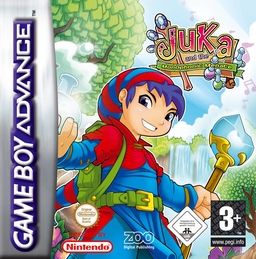
Play Juka and the Monophonic Menace (Europe edition · English / French / German / Spanish / Italian) Online
Juka and the Monophonic Menace
Play Juka and the Monophonic Menace online on GBA with sound-shot shields, potion mixing, ingredient gathering, exploration and machine puzzles.
Browser play
Game Boy Advance (GBA) — EmulatorJS controls
Default Player 1 keyboard mapping. Change keys in Controller Settings.
| Console button | Keyboard |
|---|---|
| ↑ / ↓ / ← / → | ↑ / ↓ / ← / → |
| A / B | Z / X |
| L / R | Q / E |
| START / SELECT | Enter / V |
Open Controller Settings to configure your keyboard or gamepad. Touch controls are available on mobile.
How to Play Juka and the Monophonic Menace
Quick start
Choose New Game, select a language and follow Bufo's opening lesson in the Ruins. Move down-right to the first sound machine, open potions with R and select the Sleep Potion with A; when it fails, hold A to raise the Light Shield, catch the correct sound shapes in order and press R to fire them back. The real journey then begins in the Meadow.
Controls
D-pad moves. SELECT opens the Potion Mixer/Map/Journal menu, L switches targets and R opens potions; A selects/uses the highlighted potion and B exits. At a sound machine, A raises the Light Shield and B the Dark Shield, then R fires a completed captured sequence. Swimming: B dives/surfaces. START has no documented main action; save at signposts with A.
Cheats
No cheats have been added for this edition.
Player verification and sources
Browser play was reviewed before this edition was published in the catalogue. The date below is the catalogue publication date, not the game’s original release date.
- Browser test and catalogue publication date
- Browsers and devices
- PC: Chrome, Edge and Firefox. Mobile: Chrome on Android and Safari on iPhone and iPad.
- Player engine and core
- EmulatorJS 4.3.0-pre · gba
- Tested by
- rwEmulator
Sources and editorial basis
rwEmulator reviews edition metadata, release information, game manuals and first-hand browser-play notes. Available manuals are linked below; the editorial policy explains how facts are checked and corrections are handled.