More browsing paths
Play Kaettekita! Gunjin Shougi: Nanya Sore!? (Japan edition · Japanese) Online
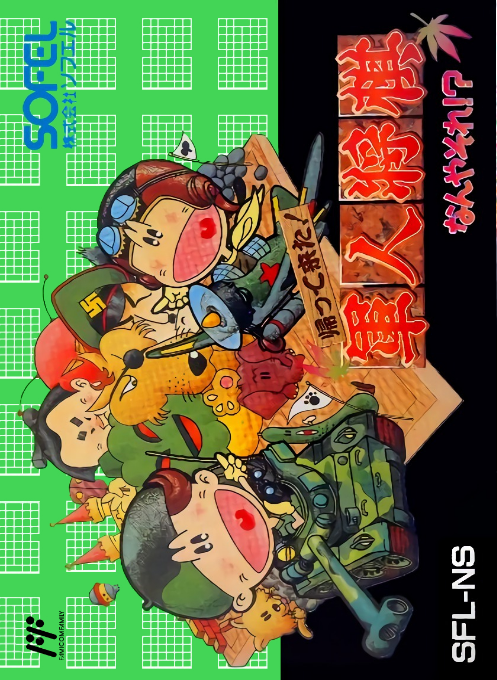
Kaettekita! Gunjin Shogi: Nanya Sore!?
“I’m back! It's military shogi! ? ” online. Read the compatibility of the pieces in the five stages and aim to occupy the general headquarters. Initial configuration, basic operations, and password restart are also explained.
Browser play
Nintendo Entertainment System (NES) / Famicom — EmulatorJS controls
Default Player 1 keyboard mapping. Change keys in Controller Settings.
| Console button | Keyboard |
|---|---|
| ↑ / ↓ / ← / → | ↑ / ↓ / ← / → |
| A / B | Z / X |
| START / SELECT | Enter / V |
Open Controller Settings to configure your keyboard or gamepad. Touch controls are available on mobile.
How to Play Kaettekita! Gunjin Shougi: Nanya Sore!?
Quick start
If you are playing alone, select "Start from beginning" from 1PLAY and select your opponent using the D-pad and A. First, use Cocona's automatic placement, check the placement, whether or not there will be a battle animation, and set the first move and second move. Select a piece on the board with A, move the cursor to the marked destination and move it again with A. If you don't know the compatibility, check the win/loss table with SELECT. Make a note of the password at the end of the match.
Controls
Cross key: Select pieces, destinations, and commands. A: Determined. B: Cancel/Display your piece type. Controller I START: Display captured pieces and captured pieces. SELECT: Displays the win/loss table between pieces. The second person uses Controller II's cross key, A, and B. To enter a password, select a character with the cross keys, press A to enter, press B to go back one character, and finally confirm "complete" with A.
Kaettekita! Gunjin Shougi: Nanya Sore!? — About this game
It is a military shogi game in which players lead 23 pieces of 16 types of pieces and fight while exploring the opponent's placement and the identity of the pieces. There are five stages: field, forest, city, ring, and space, and in the single-player game, the pieces change shape depending on the opponent. You can't win just by advancing pieces that look strong; it's important to check their compatibility on the win/loss table and use strategies to leave occupied pieces that can be placed in the enemy's headquarters. You win by capturing your opponent's general headquarters or removing all of your opponent's capture pieces outside the headquarters. You can set the placement manually or leave it to us, and you can take over the single-player progress with a password that is displayed for each battle. In a two-player match, numbers are assigned to the pieces to hide their true identity, so avoid looking at your opponent's numbering while setting up the pieces.
Cheats
No cheats have been added for this edition.
Player verification and sources
Browser play was reviewed before this edition was published in the catalogue. The date below is the catalogue publication date, not the game’s original release date.
- Browser test and catalogue publication date
- Browsers and devices
- PC: Chrome, Edge and Firefox. Mobile: Chrome on Android and Safari on iPhone and iPad.
- Player engine and core
- EmulatorJS 4.3.0-pre · nes
- Tested by
- rwEmulator
Sources and editorial basis
rwEmulator reviews edition metadata, release information, game manuals and first-hand browser-play notes. Available manuals are linked below; the editorial policy explains how facts are checked and corrections are handled.