More browsing paths
Play Kaijuu Busters (Japan edition · Revision 1 · Japanese) Online
Kaijuu Busters
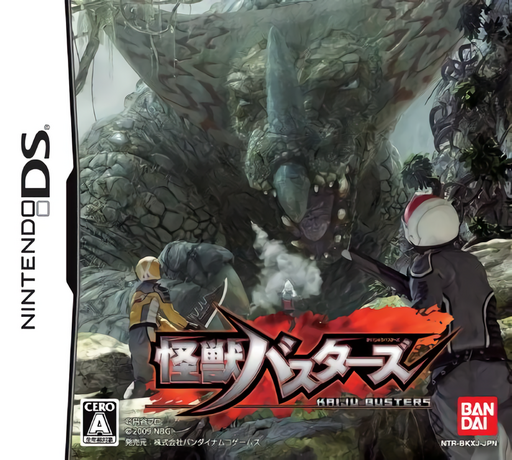
Play Kaijuu Busters online. Join the Kaijuu Busters as a rookie sent to planets with different environments and giant monsters.
Browser play
Nintendo DS (NDS) — EmulatorJS controls
Default Player 1 keyboard mapping. Change keys in Controller Settings.
| Console button | Keyboard |
|---|---|
| ↑ / ↓ / ← / → | ↑ / ↓ / ← / → |
| A / B / X / Y | Z / X / A / S |
| L / R | Q / E |
| START / SELECT | Enter / V |
| Microphone | Not assigned |
Open Controller Settings to configure your keyboard or gamepad. Touch controls are available on mobile.
How to Play Kaijuu Busters
Quick start
Create your rookie, inspect the available equipment and accept an introductory mission. Read the objective, practise movement and attack, then return with materials and inspect the development options.
Controls
Move with the directional pad and follow the selected weapon’s displayed attack and defensive commands. Use touch-screen menus for mission and equipment choices, and follow the field-search prompt when gathering resources.
Kaijuu Busters — About this game
Join the Kaijuu Busters as a rookie sent to planets with different environments and giant monsters. Accept a mission, fight with your chosen weapon and bring back materials for new equipment. Research connects repeated hunts with weapon and armour development, so a useful sample matters alongside defeating the target. Begin with the first mission and learn your weapon’s range before facing a giant opponent.
Kaijuu Busters Game manuals
Cheats
No cheats have been added for this edition.
Player verification and sources
Browser play was reviewed before this edition was published in the catalogue. The date below is the catalogue publication date, not the game’s original release date.
- Browser test and catalogue publication date
- Browsers and devices
- PC: Chrome, Edge and Firefox. Mobile: Chrome on Android and Safari on iPhone and iPad.
- Player engine and core
- EmulatorJS 4.3.0-pre · nds
- Tested by
- rwEmulator
Sources and editorial basis
rwEmulator reviews edition metadata, release information, game manuals and first-hand browser-play notes. Available manuals are linked below; the editorial policy explains how facts are checked and corrections are handled.