More browsing paths
Play Karaoke Studio (Japan edition · Japanese) Online
Karaoke Studio
Before playing karaoke studio online, check if the dedicated microphone is compatible. Introducing 15 song lessons, Nodojiman, Star is Born, and up to 3 intro songs.
Browser play
Nintendo Entertainment System (NES) / Famicom — EmulatorJS controls
Default Player 1 keyboard mapping. Change keys in Controller Settings.
| Console button | Keyboard |
|---|---|
| ↑ / ↓ / ← / → | ↑ / ↓ / ← / → |
| A / B | Z / X |
| START / SELECT | Enter / V |
Open Controller Settings to configure your keyboard or gamepad. Touch controls are available on mobile.
How to Play Karaoke Studio
Quick start
The original method uses a karaoke studio itself with a dedicated microphone. Please check first whether your current usage environment is compatible. On the mode screen, press Microphone A or SELECT to select "Lesson", then press Microphone B or START to proceed. Select the song using the same selection/decision operation, then set the tempo and pitch. If you are happy with the standard settings, select START in order and the performance will begin. The song title cursor cannot go back in the opposite direction, so let's move it around once it passes. When correcting settings, go to ⅠB. If you press START in the middle of a song, it will stop, so be careful not to keep pressing it as if it were a confirmation button.
Controls
Microphone A or SELECT: Select mode, song, tempo, and pitch in order. Mike B or START: Decide and start. If you press it in the middle of a song, it will stop, and if you have multiple reservations, it will proceed to the next song. Controller I B: Edit settings or return to title. I cross button: Select characters for name registration, confirm one character with START. ⅠA: Reservation of songs and registration of next participants when pitch is decided. For the intro, each participant presses A quickly, selects a song with A, and confirms the answer with B. A/B on the microphone side and A/B on the normal controller I do not have the same role.
Karaoke Studio — About this game
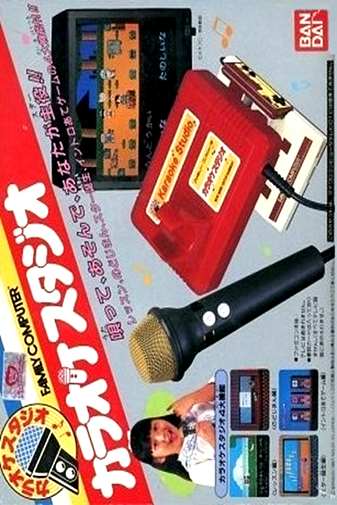
"Karaoke Studio" is a basic karaoke set for home use that allows you to sing by connecting the main unit with a dedicated microphone to the Famicom. The 15 built-in songs include nursery rhymes such as ``When I Became a First Grader'' and ``Dog Police Officer,'' songs from anime and children's programs such as ``GeGeGe no Kitaro,'' as well as pop songs and enka songs, and the lyrics are displayed on the TV screen. For free singing lessons, you can reserve up to 5 songs, and basically choose from 3 levels of tempo and pitch. In Nodojiman, the judgment is based on the voice and the progress of the song, and in the single-player version of the birth of a star, the judgment is based on the judgment. Up to 3 people will answer the intro by quickly pressing the song name. Because special equipment is used to sing and judge the original work, the same functions may not be available with regular microphones or current browsers.
Cheats
No cheats have been added for this edition.
Player verification and sources
Browser play was reviewed before this edition was published in the catalogue. The date below is the catalogue publication date, not the game’s original release date.
- Browser test and catalogue publication date
- Browsers and devices
- PC: Chrome, Edge and Firefox. Mobile: Chrome on Android and Safari on iPhone and iPad.
- Player engine and core
- EmulatorJS 4.3.0-pre · nes
- Tested by
- rwEmulator
Sources and editorial basis
rwEmulator reviews edition metadata, release information, game manuals and first-hand browser-play notes. Available manuals are linked below; the editorial policy explains how facts are checked and corrections are handled.