More browsing paths
Play Karate Joe (Unl · Europe edition · English) Online
Karate Joe
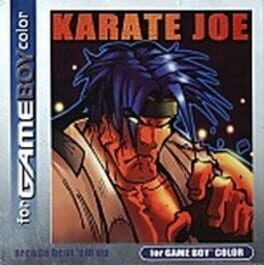
Play Karate Joe online on Game Boy Color. Fight through city gangs using Joe's hands and feet in Karate Joe. This side-scrolling arcade action game asks you to judge the gap to an opponent, strike from a useful position and avoid letting enemies surround the space you need to move.
Browser play
Game Boy Color (GBC) — EmulatorJS controls
Default Player 1 keyboard mapping. Change keys in Controller Settings.
| Console button | Keyboard |
|---|---|
| ↑ / ↓ / ← / → | ↑ / ↓ / ← / → |
| A / B | Z / X |
| START / SELECT | Enter / V |
Open Controller Settings to configure your keyboard or gamepad. Touch controls are available on mobile.
How to Play Karate Joe
Quick start
Start Joe's adventure, read the action guide and practise a basic strike before approaching the first group.
Controls
D-pad moves and selects. Punches, kicks and other actions follow the game's control guide; check the layout before play and use the displayed pause/menu prompts.
Karate Joe — About this game
Begin by learning the reach of a basic strike against the first opponent. Advance in short steps, turn toward the next threat and leave room to recover after an attack. A crowded screen is easier to read when you separate one enemy from the rest instead of swinging constantly while moving into the group.
Cheats
No cheats have been added for this edition.
Player verification and sources
Browser play was reviewed before this edition was published in the catalogue. The date below is the catalogue publication date, not the game’s original release date.
- Browser test and catalogue publication date
- Browsers and devices
- PC: Chrome, Edge and Firefox. Mobile: Chrome on Android and Safari on iPhone and iPad.
- Player engine and core
- EmulatorJS 4.3.0-pre · gb
- Tested by
- rwEmulator
Sources and editorial basis
rwEmulator reviews edition metadata, release information, game manuals and first-hand browser-play notes. Available manuals are linked below; the editorial policy explains how facts are checked and corrections are handled.