More browsing paths
Play kill.switch (US edition · English) Online
Kill Switch
Play kill.switch online on GBA and fight through mission-based 3D firefights using tactical cover, fixed aiming, weapon switching and grenades.
Browser play
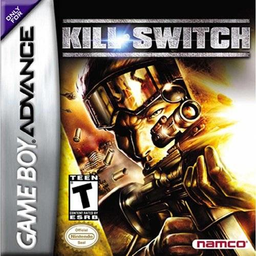
Game Boy Advance (GBA) — EmulatorJS controls
Default Player 1 keyboard mapping. Change keys in Controller Settings.
| Console button | Keyboard |
|---|---|
| ↑ / ↓ / ← / → | ↑ / ↓ / ← / → |
| A / B | Z / X |
| L / R | Q / E |
| START / SELECT | Enter / V |
Open Controller Settings to configure your keyboard or gamepad. Touch controls are available on mobile.
How to Play kill.switch
Quick start
Press START at the title screen, choose New Game and complete the opening training section before entering the mission list. Practise moving into waist-high cover with B plus a direction, then hold L+R to aim and fire with A. Use cover to clear the first targets instead of standing in the open, and press SELECT whenever you need to cycle to a different weapon. The campaign then advances through six missions made up of 18 combat stages.
Controls
Menus use the D-pad, A or START to confirm and B to go back. In play, Up/Down moves Bishop forward or back and Left strafes; L/R rotates the camera. B crouches, B plus a direction dives, and B plus a direction against a wall enters cover. In cover, L/R shifts sideways and the D-pad adjusts the view. Hold L+R to aim, press A to fire, A+B throws a grenade, SELECT cycles weapons and START pauses.
kill.switch Game manuals
Cheats
No cheats have been added for this edition.
Player verification and sources
Browser play was reviewed before this edition was published in the catalogue. The date below is the catalogue publication date, not the game’s original release date.
- Browser test and catalogue publication date
- Browsers and devices
- PC: Chrome, Edge and Firefox. Mobile: Chrome on Android and Safari on iPhone and iPad.
- Player engine and core
- EmulatorJS 4.3.0-pre · gba
- Tested by
- rwEmulator
Sources and editorial basis
rwEmulator reviews edition metadata, release information, game manuals and first-hand browser-play notes. Available manuals are linked below; the editorial policy explains how facts are checked and corrections are handled.