More browsing paths
Play Kyuukyoku Harikiri Stadium (Japan edition · Japanese) Online
Kyuukyoku Harikiri Stadium
Play Ultimate Harikiri Stadium online. Based on his condition, he sets up his batting order and controls pitching, base running, and throwing. Also check AUTO defense, player reinforcement, and start procedure.
Browser play
Nintendo Entertainment System (NES) / Famicom — EmulatorJS controls
Default Player 1 keyboard mapping. Change keys in Controller Settings.
| Console button | Keyboard |
|---|---|
| ↑ / ↓ / ← / → | ↑ / ↓ / ← / → |
| A / B | Z / X |
| START / SELECT | Enter / V |
Open Controller Settings to configure your keyboard or gamepad. Touch controls are available on mobile.
How to Play Kyuukyoku Harikiri Stadium
Quick start
Select "VS COM" as the mode, and proceed to "START" if you are starting anew. You can easily get used to defense by selecting a team with the cross, deciding with A, and choosing AUTO to help you catch the ball the first time. While looking at the players' face marks, decide the batting order with A, select the starting pitcher with the cross and confirm with START. In attack, A's swing matches the pitch, and in defense, after catching the ball, A designates the base and throws the ball. First of all, let's learn how to throw a ball to first base more reliably than trying to steal a base, and how to judge not to advance the runner too far.
Controls
Cross: player movement, base designation, batter position and pitch adjustment. A: Hitting, throwing, throwing, and returning to the designated base while running the base. To advance, use the direction of the base + B, and to move back, use the direction + A. The designated bases are first base on the right, second base on the top, third base on the left, and home base on the bottom. The pitch is A, a slow ball with top + A, a fast ball with bottom + A, and changes from left to right after release. The fielder who caught the ball throws the ball with Direction +A, and runs to the base with Direction +B. START: Transition/start of selection screen, time before starting pitching motion. I don't use SELECT.
Kyuukyoku Harikiri Stadium — About this game
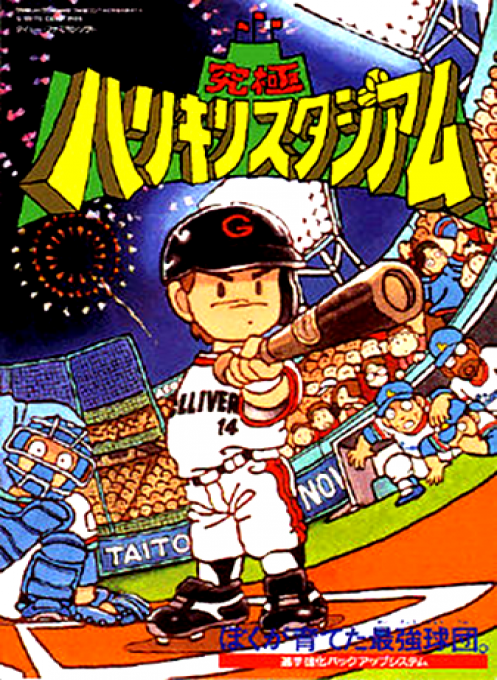
``Ultimate Harikiri Stadium'' is a baseball game where you grow your team as a manager while controlling the batting and defense yourself. Before the game, the batting order and starting pitcher are determined by checking the players' condition using face marks. In CPU games, the perspective changes between the batter's side when attacking and the pitcher's side when defending, and deals with the slowness and speed of pitching, changes, and even checks on runners. You can select AUTO as well as manual defense, but it only becomes automatic until you catch the ball, and it is up to you to decide where to throw the ball. Growth points obtained by winning CPU games can be allocated to batting power, running power, pitcher's ball speed, change, physical strength, etc. It also features interpersonal battles and home run races, allowing you to enjoy everything from short batting matches to continuous team strengthening. Please distinguish between SAVE and PASSWORD after the match and END that does not save.
Cheats
No cheats have been added for this edition.
Player verification and sources
Browser play was reviewed before this edition was published in the catalogue. The date below is the catalogue publication date, not the game’s original release date.
- Browser test and catalogue publication date
- Browsers and devices
- PC: Chrome, Edge and Firefox. Mobile: Chrome on Android and Safari on iPhone and iPad.
- Player engine and core
- EmulatorJS 4.3.0-pre · nes
- Tested by
- rwEmulator
Sources and editorial basis
rwEmulator reviews edition metadata, release information, game manuals and first-hand browser-play notes. Available manuals are linked below; the editorial policy explains how facts are checked and corrections are handled.