More browsing paths
Play Lingo met Lucille Werner (Netherlands edition) Online
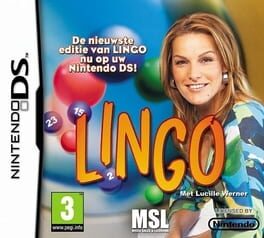
Lingo met Lucille Werner
Play Lingo met Lucille Werner online. Guess six- and seven-letter Dutch words with Lucille Werner's Lingo. See the Nintendo DS starting guide and controls.
Browser play
Nintendo DS (NDS) — EmulatorJS controls
Default Player 1 keyboard mapping. Change keys in Controller Settings.
| Console button | Keyboard |
|---|---|
| ↑ / ↓ / ← / → | ↑ / ↓ / ← / → |
| A / B / X / Y | Z / X / A / S |
| L / R | Q / E |
| START / SELECT | Enter / V |
| Microphone | Not assigned |
Open Controller Settings to configure your keyboard or gamepad. Touch controls are available on mobile.
How to Play Lingo met Lucille Werner
Quick start
Start a word round, read its required length and enter a Dutch word. Compare the feedback with the next guess, keeping the confirmed letters in their places.
Controls
Use the displayed DS letter-entry controls to compose and confirm words. Read the letter and position feedback after every attempt and follow the prompt when the next round begins.
Lingo met Lucille Werner — About this game
Lingo met Lucille Werner brings the Dutch television word game to DS. The regular word rounds use six- and seven-letter vocabulary: enter a possible word, inspect which letters and positions the result confirms, then use that information in your next attempt. Begin by learning the feedback display rather than guessing unrelated words. A useful first word can test several uncertain letters, while a later guess should preserve the positions already established. Read the required length before entering an answer and check spelling before confirming; this edition's Dutch vocabulary is the central challenge.
Lingo met Lucille Werner Game manuals
Cheats
No cheats have been added for this edition.
Player verification and sources
Browser play was reviewed before this edition was published in the catalogue. The date below is the catalogue publication date, not the game’s original release date.
- Browser test and catalogue publication date
- Browsers and devices
- PC: Chrome, Edge and Firefox. Mobile: Chrome on Android and Safari on iPhone and iPad.
- Player engine and core
- EmulatorJS 4.3.0-pre · nds
- Tested by
- rwEmulator
Sources and editorial basis
rwEmulator reviews edition metadata, release information, game manuals and first-hand browser-play notes. Available manuals are linked below; the editorial policy explains how facts are checked and corrections are handled.