More browsing paths
Play Madden NFL 2002 (US edition · English) Online
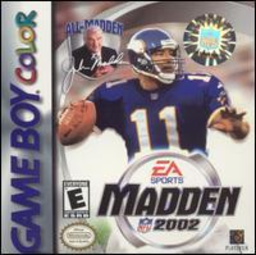
Madden NFL 2002
Play Madden NFL 2002 online on Game Boy Color. Call a play and guide your team through the next down in Madden NFL 2002. Read defensive space before passing or running, then change your approach when possession turns and your side must protect the field.
Browser play
Game Boy Color (GBC) — EmulatorJS controls
Default Player 1 keyboard mapping. Change keys in Controller Settings.
| Console button | Keyboard |
|---|---|
| ↑ / ↓ / ← / → | ↑ / ↓ / ← / → |
| A / B | Z / X |
| START / SELECT | Enter / V |
Open Controller Settings to configure your keyboard or gamepad. Touch controls are available on mobile.
How to Play Madden NFL 2002
Quick start
Choose teams and a short match, read the current control guide and practise one offensive play before experimenting with a different formation.
Controls
Use the D-pad to move players and select plays. Follow the situational A/B guide for snapping, passing, running and defensive actions; menu A confirms and B returns where offered.
Madden NFL 2002 — About this game
Learn a short offensive sequence first: select a play, watch the opening formation and carry out the intended route. On defense, concentrate on the ball's path and a useful position. Comparing one decision at a time helps you see why a drive continued or stopped.
Cheats
No cheats have been added for this edition.
Player verification and sources
Browser play was reviewed before this edition was published in the catalogue. The date below is the catalogue publication date, not the game’s original release date.
- Browser test and catalogue publication date
- Browsers and devices
- PC: Chrome, Edge and Firefox. Mobile: Chrome on Android and Safari on iPhone and iPad.
- Player engine and core
- EmulatorJS 4.3.0-pre · gb
- Tested by
- rwEmulator
Sources and editorial basis
rwEmulator reviews edition metadata, release information, game manuals and first-hand browser-play notes. Available manuals are linked below; the editorial policy explains how facts are checked and corrections are handled.