More browsing paths
Play MSX Soccer (South Korea edition) Online
MSX Soccer
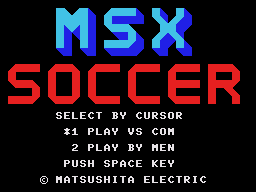
Play MSX Soccer for Master System online. Move the ball through a scrolling football pitch with passes and shots.
Browser play
Sega Master System — EmulatorJS controls
Default Player 1 keyboard mapping. Change keys in Controller Settings.
| Console button | Keyboard |
|---|---|
| ↑ / ↓ / ← / → | ↑ / ↓ / ← / → |
| 1 / START | X |
| 2 | Z |
Open Controller Settings to configure your keyboard or gamepad. Touch controls are available on mobile.
How to Play MSX Soccer
Quick start
Choose a one- or two-player match. Follow the kickoff, try a short pass and work the ball toward a shooting position.
Controls
Use the directional pad to move the controlled player and the passing and shooting actions to play the ball.
MSX Soccer — About this game
Play a football match on a top-down pitch that scrolls to follow the action. Move into space, pass the ball and look for a shooting chance rather than dribbling straight into the defence. The match includes throw-ins, corners, goal kicks and penalties, so restarting play is part of the contest as well as open-field attacks. Keep track of where the ball is moving and bring your players back into position when possession changes.
Cheats
No cheats have been added for this edition.
Player verification and sources
Browser play was reviewed before this edition was published in the catalogue. The date below is the catalogue publication date, not the game’s original release date.
- Browser test and catalogue publication date
- Browsers and devices
- PC: Chrome, Edge and Firefox. Mobile: Chrome on Android and Safari on iPhone and iPad.
- Player engine and core
- EmulatorJS 4.3.0-pre · segaMS
- Tested by
- rwEmulator
Sources and editorial basis
rwEmulator reviews edition metadata, release information, game manuals and first-hand browser-play notes. Available manuals are linked below; the editorial policy explains how facts are checked and corrections are handled.