More browsing paths
Play Rental Car (World edition) Online
Rental Car
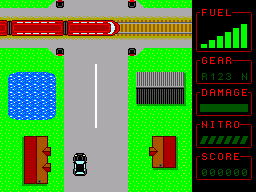
Play Rental Car online on Master System. Drive from the starting area along the route toward the rental shop, watching for buildings, trains and other obstacles.
Browser play
Sega Master System — EmulatorJS controls
Default Player 1 keyboard mapping. Change keys in Controller Settings.
| Console button | Keyboard |
|---|---|
| ↑ / ↓ / ← / → | ↑ / ↓ / ← / → |
| 1 / START | X |
| 2 | Z |
Open Controller Settings to configure your keyboard or gamepad. Touch controls are available on mobile.
How to Play Rental Car
Quick start
Up moves the car upward and shifts up; down moves downward and shifts down. Release the direction between shifts. In first gear, hold 2 and press down to stop completely.
Controls
Up moves the car upward and shifts up; down moves downward and shifts down. Release the direction between shifts. In first gear, hold 2 and press down to stop completely.
Rental Car — About this game
Drive from the starting area along the route toward the rental shop, watching for buildings, trains and other obstacles. Up and down combine lane movement with gear changes, so every speed adjustment also affects your position. Release the direction between changes instead of holding it continuously. Rough ground limits how quickly the car can travel, and a clear path matters more than forcing through a solid obstacle. Read the road ahead and slow down before a difficult passage.
Cheats
No cheats have been added for this edition.
Player verification and sources
Browser play was reviewed before this edition was published in the catalogue. The date below is the catalogue publication date, not the game’s original release date.
- Browser test and catalogue publication date
- Browsers and devices
- PC: Chrome, Edge and Firefox. Mobile: Chrome on Android and Safari on iPhone and iPad.
- Player engine and core
- EmulatorJS 4.3.0-pre · segaMS
- Tested by
- rwEmulator
Sources and editorial basis
rwEmulator reviews edition metadata, release information, game manuals and first-hand browser-play notes. Available manuals are linked below; the editorial policy explains how facts are checked and corrections are handled.