More browsing paths
Play Super Bioman I (South Korea edition · English) Online
Super Bioman I
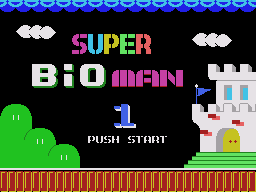
Play Super Bioman I online on Master System. Move across a numbered world map and enter platform stages with blocks, coins and enemies to jump on.
Browser play
Sega Master System — EmulatorJS controls
Default Player 1 keyboard mapping. Change keys in Controller Settings.
| Console button | Keyboard |
|---|---|
| ↑ / ↓ / ← / → | ↑ / ↓ / ← / → |
| 1 / START | X |
| 2 | Z |
Open Controller Settings to configure your keyboard or gamepad. Touch controls are available on mobile.
How to Play Super Bioman I
Quick start
Enter the first numbered stage from the map. Jump into blocks for items, collect coins and approach the stage-end symbol after clearing the route.
Controls
Directions: move on the map; left/right: move in stages. Use jump to strike blocks or stomp enemies. The powered fire attack is unavailable during boss fights.
Super Bioman I — About this game
Move across a numbered world map and enter platform stages with blocks, coins and enemies to jump on. Striking blocks can reveal items, while stage-end symbols reward completing a set. Some map locations lead directly to boss fights instead of a long course. Keep room to react when approaching pipes or kicked shells, and use jumps to handle bosses rather than relying on fire attacks that are unavailable in those encounters.
Cheats
No cheats have been added for this edition.
Player verification and sources
Browser play was reviewed before this edition was published in the catalogue. The date below is the catalogue publication date, not the game’s original release date.
- Browser test and catalogue publication date
- Browsers and devices
- PC: Chrome, Edge and Firefox. Mobile: Chrome on Android and Safari on iPhone and iPad.
- Player engine and core
- EmulatorJS 4.3.0-pre · segaMS
- Tested by
- rwEmulator
Sources and editorial basis
rwEmulator reviews edition metadata, release information, game manuals and first-hand browser-play notes. Available manuals are linked below; the editorial policy explains how facts are checked and corrections are handled.