More browsing paths
Play Zemina Best 88 (South Korea edition) Online
Zemina Best 88
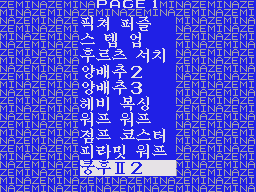
Play Zemina Best 88 online on Master System. The larger Zemina menu brings together the selections also known as Best 39 and Best 25.
Browser play
Sega Master System — EmulatorJS controls
Default Player 1 keyboard mapping. Change keys in Controller Settings.
| Console button | Keyboard |
|---|---|
| ↑ / ↓ / ← / → | ↑ / ↓ / ← / → |
| 1 / START | X |
| 2 | Z |
Open Controller Settings to configure your keyboard or gamepad. Touch controls are available on mobile.
How to Play Zemina Best 88
Quick start
Choose an entry, start it and check its opening situation before moving into danger. Comical Machine Gun Joe: Move, shoot at enemies and leave room to dodge incoming fire.
Controls
Use directional input to browse and the selection action to launch an entry. During play, directions move the character, vehicle or cursor; action inputs follow the selected game.
Zemina Best 88 — About this game
The larger Zemina menu brings together the selections also known as Best 39 and Best 25. Included choices: Comical Machine Gun Joe, Galaga, Dig Dug. Comical Machine Gun Joe: Move, shoot at enemies and leave room to dodge incoming fire. Choose one entry and learn its goal before moving to another. The challenges and available actions change with the selected game, so follow the current play screen and respond to the obstacles in front of you.
Cheats
No cheats have been added for this edition.
Player verification and sources
Browser play was reviewed before this edition was published in the catalogue. The date below is the catalogue publication date, not the game’s original release date.
- Browser test and catalogue publication date
- Browsers and devices
- PC: Chrome, Edge and Firefox. Mobile: Chrome on Android and Safari on iPhone and iPad.
- Player engine and core
- EmulatorJS 4.3.0-pre · segaMS
- Tested by
- rwEmulator
Sources and editorial basis
rwEmulator reviews edition metadata, release information, game manuals and first-hand browser-play notes. Available manuals are linked below; the editorial policy explains how facts are checked and corrections are handled.