More browsing paths
Play Microsoft - The Best of Entertainment Pack (Europe edition · English) Online
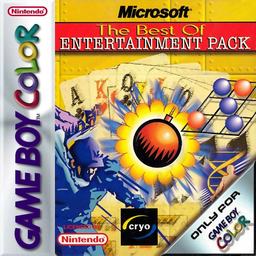
Microsoft - The Best of Entertainment Pack
Play Microsoft - The Best of Entertainment Pack online on Game Boy Color. Choose from a collection of short Microsoft games adapted for the Game Boy Color, with card puzzles, mine finding and downhill skiing among the activities. The Best of Entertainment Pack changes pace when you switch games, so each selection is a fresh set of rules rather than another level of the same challenge.
Browser play
Game Boy Color (GBC) — EmulatorJS controls
Default Player 1 keyboard mapping. Change keys in Controller Settings.
| Console button | Keyboard |
|---|---|
| ↑ / ↓ / ← / → | ↑ / ↓ / ← / → |
| A / B | Z / X |
| START / SELECT | Enter / V |
Open Controller Settings to configure your keyboard or gamepad. Touch controls are available on mobile.
How to Play Microsoft - The Best of Entertainment Pack
Quick start
Open the game-selection menu, choose one title and read its help or opening instructions. Complete a first short attempt, then return to the collection menu to choose another game.
Controls
The D-pad selects games and moves the active cursor or skier. A confirms menu choices; B cancels or returns where offered. Use each game’s help screen for card selection, mine marking and other specific actions, since their button functions differ.
Microsoft - The Best of Entertainment Pack — About this game
Start with one familiar game and read its instructions before trying the others. Card games reward checking available moves, mine finding asks you to use revealed information, and skiing needs timely steering. Keep the current game’s goal in mind and return to the collection menu when you want a different kind of session.
Cheats
No cheats have been added for this edition.
Player verification and sources
Browser play was reviewed before this edition was published in the catalogue. The date below is the catalogue publication date, not the game’s original release date.
- Browser test and catalogue publication date
- Browsers and devices
- PC: Chrome, Edge and Firefox. Mobile: Chrome on Android and Safari on iPhone and iPad.
- Player engine and core
- EmulatorJS 4.3.0-pre · gb
- Tested by
- rwEmulator
Sources and editorial basis
rwEmulator reviews edition metadata, release information, game manuals and first-hand browser-play notes. Available manuals are linked below; the editorial policy explains how facts are checked and corrections are handled.