More browsing paths
Play Mingzhu Koudai Guaishou 2 (Unl · Taiwan edition · Traditional Chinese) Online
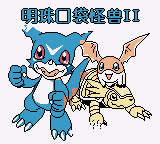
Mingzhu Koudai Guaishou 2
Play Mingzhu Koudai Guaishou 2 online on GBC. Choose from a mixed cast of Pokémon and Digimon in an RPG whose battles include rapid A-button input.
Browser play
Game Boy Color (GBC) — EmulatorJS controls
Default Player 1 keyboard mapping. Change keys in Controller Settings.
| Console button | Keyboard |
|---|---|
| ↑ / ↓ / ← / → | ↑ / ↓ / ← / → |
| A / B | Z / X |
| START / SELECT | Enter / V |
Open Controller Settings to configure your keyboard or gamepad. Touch controls are available on mobile.
How to Play Mingzhu Koudai Guaishou 2
Quick start
Choose a starting creature, inspect the commands and wait for the battle's A-button phase before pressing rapidly.
Controls
Use the directional pad to move or select and follow the menu confirmation prompts. During the indicated battle phase, press A repeatedly; pause between phases to read the next instruction.
Mingzhu Koudai Guaishou 2 — About this game
This Chinese release belongs to the Digimon D-4 family, with a crossover cast and an unusual battle rhythm. Learn the menus before concentrating on repeated presses: the choice that begins an exchange still matters. Check the creature's condition afterward and prepare for the next encounter instead of pressing continuously through every screen.
Cheats
No cheats have been added for this edition.
Player verification and sources
Browser play was reviewed before this edition was published in the catalogue. The date below is the catalogue publication date, not the game’s original release date.
- Browser test and catalogue publication date
- Browsers and devices
- PC: Chrome, Edge and Firefox. Mobile: Chrome on Android and Safari on iPhone and iPad.
- Player engine and core
- EmulatorJS 4.3.0-pre · gb
- Tested by
- rwEmulator
Sources and editorial basis
rwEmulator reviews edition metadata, release information, game manuals and first-hand browser-play notes. Available manuals are linked below; the editorial policy explains how facts are checked and corrections are handled.