More browsing paths
Play The Muppets (AX9P · Europe edition · English / French / German / Spanish / Italian / Dutch / Swedish) Online
Muppets, The
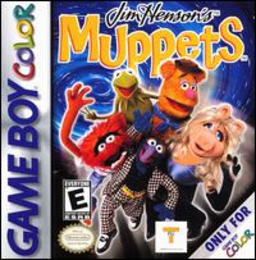
Play The Muppets online on GBC. A malfunctioning time machine scatters the Muppets through different eras. Choose Kermit or Animal and explore the time zones to bring the missing performers home, collecting the special objects needed before each rescue.
Browser play
Game Boy Color (GBC) — EmulatorJS controls
Default Player 1 keyboard mapping. Change keys in Controller Settings.
| Console button | Keyboard |
|---|---|
| ↑ / ↓ / ← / → | ↑ / ↓ / ← / → |
| A / B | Z / X |
| START / SELECT | Enter / V |
Open Controller Settings to configure your keyboard or gamepad. Touch controls are available on mobile.
How to Play The Muppets
Quick start
Choose Kermit or Animal and a time zone. Practise A to jump and B to attack, explore for special items and use SELECT to review what you have collected before attempting the rescue.
Controls
The D-pad moves and Down crouches. A jumps; Up+A gives Kermit a big jump or Animal a stomp. B uses paper planes or drumsticks. SELECT shows special pickups; START pauses.
The Muppets — About this game
The Muppets for Game Boy Color. Kermit’s high jump and Animal’s stomp give the same obstacle different solutions. Search the early levels of a time zone for special items, not just the quickest exit. Food restores energy and ammunition supports the paper-plane or drumstick attacks.
The Muppets Game manuals
Cheats
No cheats have been added for this edition.
Player verification and sources
Browser play was reviewed before this edition was published in the catalogue. The date below is the catalogue publication date, not the game’s original release date.
- Browser test and catalogue publication date
- Browsers and devices
- PC: Chrome, Edge and Firefox. Mobile: Chrome on Android and Safari on iPhone and iPad.
- Player engine and core
- EmulatorJS 4.3.0-pre · gb
- Tested by
- rwEmulator
Sources and editorial basis
rwEmulator reviews edition metadata, release information, game manuals and first-hand browser-play notes. Available manuals are linked below; the editorial policy explains how facts are checked and corrections are handled.