More browsing paths
Play Namco Museum DS (US edition · English) Online
Namco Museum DS
Play Namco Museum DS online. Start with Pac-Man maze routes and power pellets, then explore seven arcade classics and their different rules.
Browser play
Nintendo DS (NDS) — EmulatorJS controls
Default Player 1 keyboard mapping. Change keys in Controller Settings.
| Console button | Keyboard |
|---|---|
| ↑ / ↓ / ← / → | ↑ / ↓ / ← / → |
| A / B / X / Y | Z / X / A / S |
| L / R | Q / E |
| START / SELECT | Enter / V |
| Microphone | Not assigned |
Open Controller Settings to configure your keyboard or gamepad. Touch controls are available on mobile.
How to Play Namco Museum DS
Quick start
Choose Pac-Man from the game list and use the displayed start command. Guide him along a short route through the dots, turning at junctions before ghosts trap him. A power pellet temporarily lets him chase ghosts. Clear the maze to advance, then try another included game when you want a different challenge.
Controls
Use the +Control Pad to steer Pac-Man through the maze; choose directions at junctions rather than pressing an attack button. Power pellets work when collected. Use the game selection interface to change titles, and check the selected game’s control display before playing a shooter or another arcade game.
Namco Museum DS — About this game
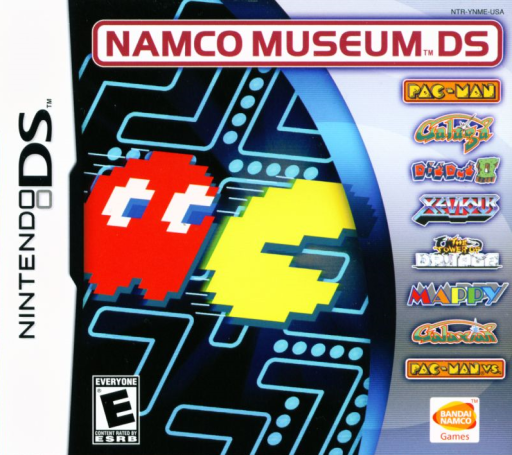
Namco Museum DS brings together seven arcade games with distinct goals. Pac-Man sends you around a maze collecting dots while ghosts close off routes; Galaga and Galaxian turn the screen into a shooting gallery, and Xevious adds ground targets to its aerial action. Mappy, Dig Dug II and The Tower of Druaga broaden the collection with different movement and survival challenges. A separate DS adaptation of Pac-Man VS. sits alongside the arcade selection. Start with one familiar game and learn its rules before switching; the collection rewards recognizing patterns rather than treating every title as the same kind of challenge.
Namco Museum DS Game manuals
Cheats
No cheats have been added for this edition.
Player verification and sources
Browser play was reviewed before this edition was published in the catalogue. The date below is the catalogue publication date, not the game’s original release date.
- Browser test and catalogue publication date
- Browsers and devices
- PC: Chrome, Edge and Firefox. Mobile: Chrome on Android and Safari on iPhone and iPad.
- Player engine and core
- EmulatorJS 4.3.0-pre · nds
- Tested by
- rwEmulator
Sources and editorial basis
rwEmulator reviews edition metadata, release information, game manuals and first-hand browser-play notes. Available manuals are linked below; the editorial policy explains how facts are checked and corrections are handled.