More browsing paths
Play Ochin ni Toshi Puzzle Tonjan!? (Japan edition · Japanese) Online
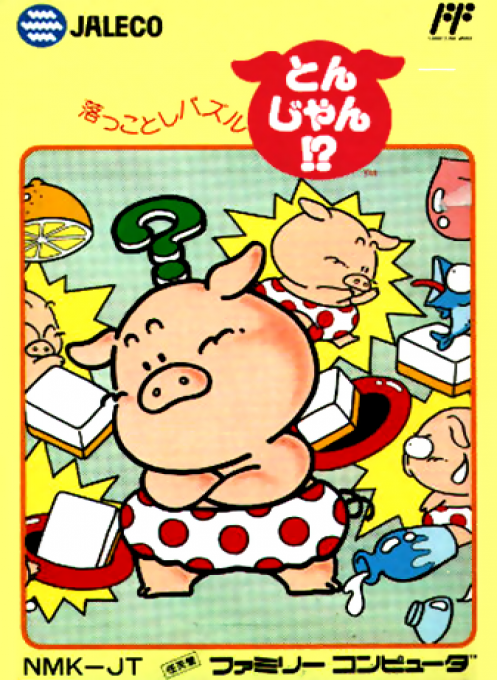
Ochin ni Toshi Puzzle Tonjan!?
Play Fallen Puzzle Tonjan!? online. Use B's push and A's punch to clear tiles into the hole within the specified number. Check out how to get started and how to operate it.
Browser play
Nintendo Entertainment System (NES) / Famicom — EmulatorJS controls
Default Player 1 keyboard mapping. Change keys in Controller Settings.
| Console button | Keyboard |
|---|---|
| ↑ / ↓ / ← / → | ↑ / ↓ / ← / → |
| A / B | Z / X |
| START / SELECT | Enter / V |
Open Controller Settings to configure your keyboard or gamepad. Touch controls are available on mobile.
How to Play Ochin ni Toshi Puzzle Tonjan!?
Quick start
In the title, move the pig cursor to "From the beginning" and start. When the girl's screen appears, press A to start. First, check the clear tiles, holes, and the specified number of tiles that can be dropped, and then think about whether the pig can go around after pushing the tiles. Use the cross button to adjust the direction, use B for fine adjustments, and A for large changes. You can't pull back, so until you get used to it, it's best to move one square at a time and see the results. If you can't move it, you can surrender with SELECT, but you will lose one stock.
Controls
Cross button: Move the pig and change its orientation. B: Push the tile one square in the direction it is facing. A: A punch that moves walls and face down tiles all at once. Both allow you to move adjacent tiles together. SELECT: Surrender and start over on that side. START: Starts with title, pauses during play. On the password screen, select a tile with the cross, enter with A, cancel with B, and confirm END with A. Controller II: Press A to change songs, and press B to turn on/off BGM.
Ochin ni Toshi Puzzle Tonjan!? — About this game
A puzzle game where you control a pig on the board and drop all the clear tiles specified on that side into the hole. Mahjong tiles are lined up, but rather than playing a game, it's a game where you think about the arrangement of the tiles and the order in which you press them. B's push moves one square, A's punch moves until it hits a wall or face down tile, and connected tiles can be pushed all at once. However, you can't pull the tiles, so it's important to have a plan that doesn't block the passage or push the tiles you need to the edge. There is a set number of tiles that can be dropped on each side, and if you exceed the specified number or drop a "lost tile", you will fail. There are also chance tiles to increase your score and ``one more tile'' to increase the specified number by one, making it fun not only to clear but also to choose tiles to drop. When you get stuck, surrender, re-arrange, and try a different procedure.
Cheats
No cheats have been added for this edition.
Player verification and sources
Browser play was reviewed before this edition was published in the catalogue. The date below is the catalogue publication date, not the game’s original release date.
- Browser test and catalogue publication date
- Browsers and devices
- PC: Chrome, Edge and Firefox. Mobile: Chrome on Android and Safari on iPhone and iPad.
- Player engine and core
- EmulatorJS 4.3.0-pre · nes
- Tested by
- rwEmulator
Sources and editorial basis
rwEmulator reviews edition metadata, release information, game manuals and first-hand browser-play notes. Available manuals are linked below; the editorial policy explains how facts are checked and corrections are handled.