More browsing paths
Play Oeka Kids: Anpanman no Hiragana Daisuki (Japan edition · Japanese) Online
Oeka Kids: Anpanman no Hiragana Daisuki
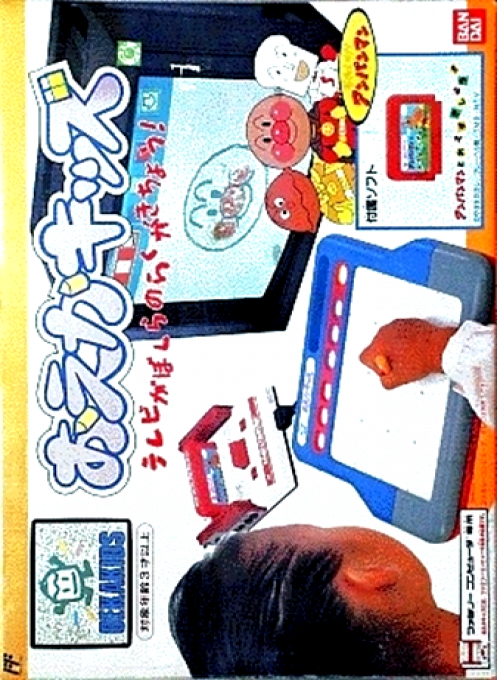
Play the FC version of ``Oeka Kids Anpanman's Hiragana Daisuki'' online. This is an educational software for young children that uses a special Oeka Kids tablet and pen to learn how to read, write and trace hiragana together with Anpanman. Check out the basic operations and how to proceed in the early stages and take on the challenge.
Browser play
Nintendo Entertainment System (NES) / Famicom — EmulatorJS controls
Default Player 1 keyboard mapping. Change keys in Controller Settings.
| Console button | Keyboard |
|---|---|
| ↑ / ↓ / ← / → | ↑ / ↓ / ← / → |
| A / B | Z / X |
| START / SELECT | Enter / V |
Open Controller Settings to configure your keyboard or gamepad. Touch controls are available on mobile.
How to Play Oeka Kids: Anpanman no Hiragana Daisuki
Quick start
Enable tablet input in a supported environment and start with START. Move the pen to the items on the screen and lightly touch to select the task you want to play. When dictating, move the sample slowly along the line from the starting point, and trace it until the end point without letting go halfway. It is assumed that the return and exit marks will also be selected with a pen. If it does not respond, check whether the tablet coordinate input is assigned instead of the normal mouse.
Controls
Special pen: Point to items on the screen, touch to decide, draw lines and hiragana. Tablet surface: position input corresponding to the screen. START: Soft start. It is assumed that the cross, A, and B on the normal controller are for auxiliary menus or unused. SELECT: May be used for assignment switching and completion assistance.
Oeka Kids: Anpanman no Hiragana Daisuki — About this game
``Oeka Kids Anpanman's Hiragana Daisuki'' is a learning software for young children that connects a special tablet to the FC main unit and selects letters and pictures on the screen with a pen. Following Anpanman's guidance, the children proceed to tasks such as choosing hiragana, tracing sample lines, and matching letters and pictures. This is not a work that you can play with just the normal cross button, but the main input is the position and contact of the pen. If you want to play with an emulator, you will need an environment and pointer settings that support Oeka Kids tablet input.
Cheats
No cheats have been added for this edition.
Player verification and sources
Browser play was reviewed before this edition was published in the catalogue. The date below is the catalogue publication date, not the game’s original release date.
- Browser test and catalogue publication date
- Browsers and devices
- PC: Chrome, Edge and Firefox. Mobile: Chrome on Android and Safari on iPhone and iPad.
- Player engine and core
- EmulatorJS 4.3.0-pre · nes
- Tested by
- rwEmulator
Sources and editorial basis
rwEmulator reviews edition metadata, release information, game manuals and first-hand browser-play notes. Available manuals are linked below; the editorial policy explains how facts are checked and corrections are handled.