More browsing paths
Play Pac-Man World (Europe edition · English / French / German / Spanish / Italian) Online
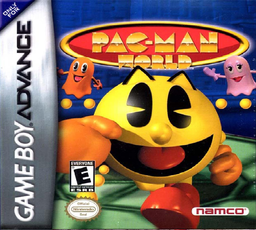
Pac-Man World
Play Pac-Man World online on GBA, explore Ghost Island, rescue Pac-Man’s friends and use jumps, Rev Rolls, Butt-Bounces and Pac-Dot attacks.
Browser play
Game Boy Advance (GBA) — EmulatorJS controls
Default Player 1 keyboard mapping. Change keys in Controller Settings.
| Console button | Keyboard |
|---|---|
| ↑ / ↓ / ← / → | ↑ / ↓ / ← / → |
| A / B | Z / X |
| L / R | Q / E |
| START / SELECT | Enter / V |
Open Controller Settings to configure your keyboard or gamepad. Touch controls are available on mobile.
How to Play Pac-Man World
Quick start
Choose Play New Game, select the first unlocked level, Buccaneer Beach, and press A. Follow its hint signs while rescuing Pac-Man’s captured friends: collect fruit for matching Fruit Doors, find the P-A-C-M-A-N letters and use Butt-Bounce on enemies or high ledges. The game offers a save prompt after each completed stage.
Controls
D-pad moves. A jumps; press A again in the air for Butt-Bounce. Hold and release B for a Rev Roll. In water, A swims up and B swims down; hold A for a Dolphin Jump. R throws one Pac-Dot, or hold R with at least ten dots for a Super Pac-Dot blast. SELECT shows the HUD and START pauses. Menus use Left/Right, A confirm and B cancel.
Pac-Man World Game manuals
Cheats
No cheats have been added for this edition.
Player verification and sources
Browser play was reviewed before this edition was published in the catalogue. The date below is the catalogue publication date, not the game’s original release date.
- Browser test and catalogue publication date
- Browsers and devices
- PC: Chrome, Edge and Firefox. Mobile: Chrome on Android and Safari on iPhone and iPad.
- Player engine and core
- EmulatorJS 4.3.0-pre · gba
- Tested by
- rwEmulator
Sources and editorial basis
rwEmulator reviews edition metadata, release information, game manuals and first-hand browser-play notes. Available manuals are linked below; the editorial policy explains how facts are checked and corrections are handled.