More browsing paths
Play Mega Twins (Japan edition · Japanese) Online
Chiki Chiki Boys
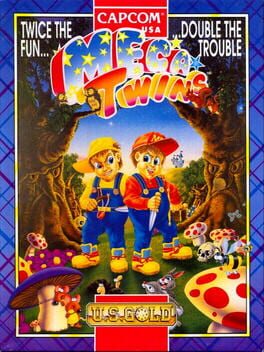
Play Mega Twins Online — Two young adventurers set out through colourful platform stages full of monsters, treasure and routes that reward exploration.
Browser play
PC Engine CD / TurboGrafx-CD — EmulatorJS controls
Default Player 1 keyboard mapping. Change keys in Controller Settings.
| Console button | Keyboard |
|---|---|
| ↑ / ↓ / ← / → | ↑ / ↓ / ← / → |
| I / II | Z / X |
| RUN / SELECT | Enter / V |
Open Controller Settings to configure your keyboard or gamepad. Touch controls are available on mobile.
How to Play Mega Twins
Quick start
Choose a hero, practise a jump and sword strike, and collect the first useful items before attempting a more exposed route.
Controls
The directional pad moves the character. I jumps and II attacks; RUN starts or pauses play.
Mega Twins — About this game
Two young adventurers set out through colourful platform stages full of monsters, treasure and routes that reward exploration. Sword attacks handle nearby enemies, while limited magic offers a way out of more crowded situations. Jumps and the layout of ledges are as important as combat, because a promising item may lie on a route that exposes the hero to danger. Learn the spacing of the sword and collect resources without losing sight of the next safe platform. The comic fantasy setting supports an adventure that mixes direct action with small decisions about which path to take.
Cheats
No cheats have been added for this edition.
Player verification and sources
Browser play was reviewed before this edition was published in the catalogue. The date below is the catalogue publication date, not the game’s original release date.
- Browser test and catalogue publication date
- Browsers and devices
- PC: Chrome, Edge and Firefox. Mobile: Chrome on Android and Safari on iPhone and iPad.
- Player engine and core
- EmulatorJS 4.3.0-pre · pce
- Tested by
- rwEmulator
Sources and editorial basis
rwEmulator reviews edition metadata, release information, game manuals and first-hand browser-play notes. Available manuals are linked below; the editorial policy explains how facts are checked and corrections are handled.