More browsing paths
Play Phalanx (Europe edition · English / French / German / Spanish / Italian / Dutch) Online
Phalanx
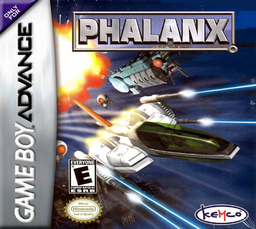
Play Phalanx online on GBA and pilot the A-144 through eight scrolling stages with selectable speed, stored power-up weapons, charged fire and special bombs.
Browser play
Game Boy Advance (GBA) — EmulatorJS controls
Default Player 1 keyboard mapping. Change keys in Controller Settings.
| Console button | Keyboard |
|---|---|
| ↑ / ↓ / ← / → | ↑ / ↓ / ← / → |
| A / B | Z / X |
| L / R | Q / E |
| START / SELECT | Enter / V |
Open Controller Settings to configure your keyboard or gamepad. Touch controls are available on mobile.
How to Play Phalanx
Quick start
Choose Game Start and begin on Easy while learning the eight-stage route over Delia. Keep the default Type A layout, use SELECT to find a comfortable one of three speeds and collect weapon icons before they scroll away. R cycles stored power-up weapons; save the limited L bombs for dense waves or bosses, and reduce speed in narrow cave sections.
Controls
D-pad manoeuvres the A-144. A fires the normal weapon; hold and release A when using a charge-capable weapon. R cycles stored power-up weapons, L launches a limited special bomb, SELECT changes among the three ship speeds and START pauses. Options can remap the Type A buttons and set difficulty, stock and speeds.
Phalanx Game manuals
Cheats
No cheats have been added for this edition.
Player verification and sources
Browser play was reviewed before this edition was published in the catalogue. The date below is the catalogue publication date, not the game’s original release date.
- Browser test and catalogue publication date
- Browsers and devices
- PC: Chrome, Edge and Firefox. Mobile: Chrome on Android and Safari on iPhone and iPad.
- Player engine and core
- EmulatorJS 4.3.0-pre · gba
- Tested by
- rwEmulator
Sources and editorial basis
rwEmulator reviews edition metadata, release information, game manuals and first-hand browser-play notes. Available manuals are linked below; the editorial policy explains how facts are checked and corrections are handled.