More browsing paths
Play Pinobee: Wings of Adventure (France edition · French) Online
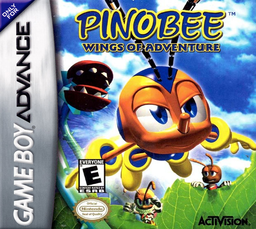
Pinobee: Les Ailes de L'Aventure
Play Pinobee: Wings of Adventure online on GBA, glide, climb walls and chain Flying Dashes by collecting objects and journal pages.
Browser play
Game Boy Advance (GBA) — EmulatorJS controls
Default Player 1 keyboard mapping. Change keys in Controller Settings.
| Console button | Keyboard |
|---|---|
| ↑ / ↓ / ← / → | ↑ / ↓ / ← / → |
| A / B | Z / X |
| L / R | Q / E |
| START / SELECT | Enter / V |
Open Controller Settings to configure your keyboard or gamepad. Touch controls are available on mobile.
How to Play Pinobee: Wings of Adventure
Quick start
Press A, B or START, choose New Diary then start the first level. Walk through traps and enemies to the exit and hit checkpoints to restore health and set a checkpoint. Pinobee starts heartless: collect the objects and read the journal after each level, because the journey and the discoveries influence the adventure.
Controls
Left/right moves Pinobee; high makes it hover on the ground or climb walls; low crouches him, lowers him in flight or onto a wall. A jumps to the ground and performs a Flying Dash in the air; hold a direction with A to aim, with auto-lock in proximity. START pauses and opens objects. B cancels in the menus; SELECT deletes a journal only from Diary Select.
Pinobee: Wings of Adventure Game manuals
Cheats
No cheats have been added for this edition.
Player verification and sources
Browser play was reviewed before this edition was published in the catalogue. The date below is the catalogue publication date, not the game’s original release date.
- Browser test and catalogue publication date
- Browsers and devices
- PC: Chrome, Edge and Firefox. Mobile: Chrome on Android and Safari on iPhone and iPad.
- Player engine and core
- EmulatorJS 4.3.0-pre · gba
- Tested by
- rwEmulator
Sources and editorial basis
rwEmulator reviews edition metadata, release information, game manuals and first-hand browser-play notes. Available manuals are linked below; the editorial policy explains how facts are checked and corrections are handled.