More browsing paths
Play Project S-11 (US edition · English) Online
Project S-11
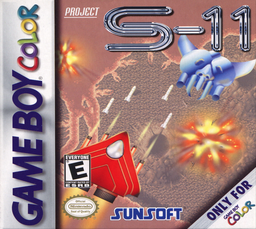
Play Project S-11 online on GBC. Project S-11 sends a modified combat craft through vertically scrolling attacks against an alien threat.
Browser play
Game Boy Color (GBC) — EmulatorJS controls
Default Player 1 keyboard mapping. Change keys in Controller Settings.
| Console button | Keyboard |
|---|---|
| ↑ / ↓ / ← / → | ↑ / ↓ / ← / → |
| A / B | Z / X |
| START / SELECT | Enter / V |
Open Controller Settings to configure your keyboard or gamepad. Touch controls are available on mobile.
How to Play Project S-11
Quick start
Begin the first stage and learn the craft’s movement with ordinary fire. Collect a reachable weapon, notice its coverage and practice short dodges. Approach the first larger enemy with space to move.
Controls
D-pad moves the craft. A fires the current weapon, B uses the available bomb/special action, and START pauses or opens the available menu. Check the HUD for remaining resources before spending a special attack.
Project S-11 — About this game
Watch the space around the craft before chasing a pickup. A stronger-looking weapon is not useful if collecting it means flying into a trapped position. Make small dodges for clear threats and move early when a larger pattern approaches. Preserve a route to the side, then line up shots when it is safe. Bombs are most useful when they solve an immediate survival problem.
Cheats
No cheats have been added for this edition.
Player verification and sources
Browser play was reviewed before this edition was published in the catalogue. The date below is the catalogue publication date, not the game’s original release date.
- Browser test and catalogue publication date
- Browsers and devices
- PC: Chrome, Edge and Firefox. Mobile: Chrome on Android and Safari on iPhone and iPad.
- Player engine and core
- EmulatorJS 4.3.0-pre · gb
- Tested by
- rwEmulator
Sources and editorial basis
rwEmulator reviews edition metadata, release information, game manuals and first-hand browser-play notes. Available manuals are linked below; the editorial policy explains how facts are checked and corrections are handled.