More browsing paths
Play Rampart (US edition · English) Online
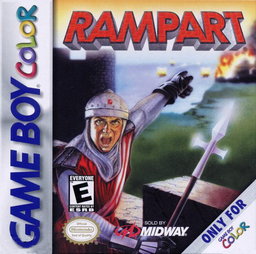
Rampart
Play Rampart online on GBC. Rampart alternates cannon combat with repairing castle walls under a timer.
Browser play
Game Boy Color (GBC) — EmulatorJS controls
Default Player 1 keyboard mapping. Change keys in Controller Settings.
| Console button | Keyboard |
|---|---|
| ↑ / ↓ / ← / → | ↑ / ↓ / ← / → |
| A / B | Z / X |
| START / SELECT | Enter / V |
Open Controller Settings to configure your keyboard or gamepad. Touch controls are available on mobile.
How to Play Rampart
Quick start
Choose a starting castle, place available cannons and follow the first combat phase. When building begins, close the most manageable gap first. Confirm a complete enclosure before expanding or adding more guns.
Controls
D-pad moves the aiming or placement cursor. A fires or confirms a placed piece; B handles the available rotation or cancellation for the current phase. Watch the phase label and use its displayed controls; START opens the available menu.
Rampart — About this game
During construction, secure one complete castle enclosure before reaching for a larger area. A long ambitious wall is useless if a single gap remains when time expires. In combat, aim where a moving ship will be rather than where it was when you began the shot. Keep enough open interior space for cannons and avoid repairs that leave the next placement awkward.
Cheats
No cheats have been added for this edition.
Player verification and sources
Browser play was reviewed before this edition was published in the catalogue. The date below is the catalogue publication date, not the game’s original release date.
- Browser test and catalogue publication date
- Browsers and devices
- PC: Chrome, Edge and Firefox. Mobile: Chrome on Android and Safari on iPhone and iPad.
- Player engine and core
- EmulatorJS 4.3.0-pre · gb
- Tested by
- rwEmulator
Sources and editorial basis
rwEmulator reviews edition metadata, release information, game manuals and first-hand browser-play notes. Available manuals are linked below; the editorial policy explains how facts are checked and corrections are handled.