More browsing paths
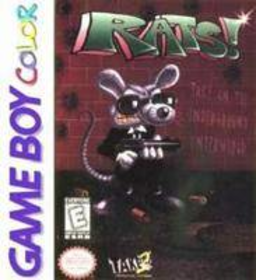
Play Rats! (GB Compatible · US edition · English / Spanish) Online
Rats!
Play Rats! online on GBC. Guide Mr. Rez through compact platform stages to rescue Loretta. Collect every piece of food to open the exit, shoot dangerous enemies and watch for the eggs into which defeated foes mutate. Moving an egg off its platform can prevent a worse opponent from emerging.
Browser play
Game Boy Color (GBC) — EmulatorJS controls
Default Player 1 keyboard mapping. Change keys in Controller Settings.
| Console button | Keyboard |
|---|---|
| ↑ / ↓ / ← / → | ↑ / ↓ / ← / → |
| A / B | Z / X |
| START / SELECT | Enter / V |
Open Controller Settings to configure your keyboard or gamepad. Touch controls are available on mobile.
How to Play Rats!
Quick start
Choose Start Game and confirm with START or A/B. Use A to jump and B to fire, collect all food and enter the door that opens. Note the password shown at the start of a level.
Controls
Left/Right walks, A jumps and B fires. START pauses and resumes. In the title menu, choose Start Game or Password with the D-pad and confirm with START or A/B.
Rats! — About this game
Rats! for Game Boy Color. The farm, sewers and other environments turn each room into a route-planning problem. Food is essential for progress, while clearing enemies can lead to bonus stages. Work quickly: when the hourglass expires, a flying pursuer arrives. Passwords preserve a point from which to resume.
Rats! Game manuals
Cheats
No cheats have been added for this edition.
Player verification and sources
Browser play was reviewed before this edition was published in the catalogue. The date below is the catalogue publication date, not the game’s original release date.
- Browser test and catalogue publication date
- Browsers and devices
- PC: Chrome, Edge and Firefox. Mobile: Chrome on Android and Safari on iPhone and iPad.
- Player engine and core
- EmulatorJS 4.3.0-pre · gb
- Tested by
- rwEmulator
Sources and editorial basis
rwEmulator reviews edition metadata, release information, game manuals and first-hand browser-play notes. Available manuals are linked below; the editorial policy explains how facts are checked and corrections are handled.